Opting for dash cams that do not require smart phone connectivity is an excellent choice for drivers who prioritize simplicity, privacy, and immediate physical control over their recording devices.
This guide is designed for car owners, fleet managers, and privacy-conscious individuals who want robust surveillance without the complexity of app-based setups. We assume a basic familiarity with vehicle interiors and a desire for a "set it and forget it" hardware experience.
By the end of this guide, you will be able to select, mount, and manage a standalone dash cam system, troubleshoot basic hardware issues, and maintain your storage media for long-term reliability.
- Understanding hardware-only dash cam interfaces.
- Selecting the right storage media for screen-based cameras.
- The importance of physical power management.
- Installing units that function independently of cloud servers.
- Best practices for manual file retrieval and maintenance.
Overview & Prerequisites

The Philosophy of Standalone Systems
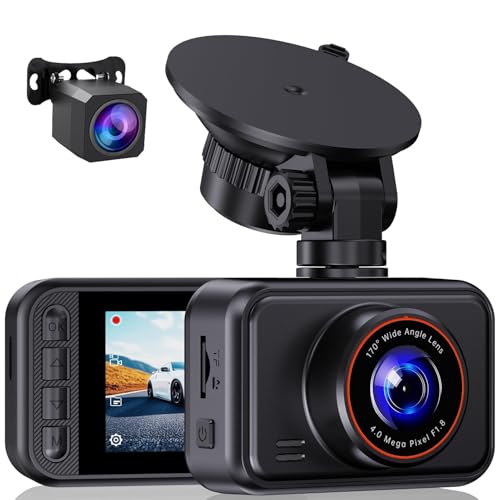
Unlike modern connected cameras that rely on Wi-Fi or Bluetooth, standalone dash cams use integrated LCD screens and physical buttons. This design removes the vulnerability of app-sync errors and ensures your data remains on your physical memory card rather than a cloud server. For more on how these devices interact with your vehicle's power, see Do dash cams record when the car is off? Everything You Need to Know for 24/7 Security.
Tools and Hardware Checklist
Before beginning, ensure you have a high-endurance microSD card (Class 10 or higher recommended), a clean microfiber cloth for windshield prep, and your vehicle's owner's manual to locate the accessory fuse box if planning a hardwire installation.
Always verify the maximum storage capacity supported by your device. Using a card that exceeds the manufacturer's specification can lead to system freezes or boot-looping.
Core Concepts & Fundamentals

On-Device UI vs. App-Centric UI
Dash cams that do not require smart phone control rely entirely on the screen and buttons built into the chassis. Understanding the menu hierarchy is critical, as you will use these physical buttons for file locking, formatting cards, and adjusting resolution. Learning these mechanics is essential for ensuring your How Does Baby Car Camera Work? Top 5 Systems for 2026 Reviewed knowledge is transferable to all vehicle monitoring gear.
Data Sovereignty and Local Storage
Because these cameras do not "phone home," they provide higher data security. You must manage files manually by removing the SD card and reading it on a computer. This fundamental process ensures that you are in total control of your video library without third-party interference.
| Feature | Standalone (No Phone) | App-Connected |
|---|---|---|
| Control | Physical Buttons/Screen | Mobile Application |
| Privacy | High (Local Only) | Variable (Cloud Sync) |
| Maintenance | Manual Card Inspection | Automatic Over-the-air |
Step-by-Step Execution Guide

Preparation Phase
Begin by formatting your microSD card within the dash cam itself. This ensures the file system structure is compatible with the camera's specific firmware.
Installation and Configuration
Best Practices & Pro Tips

Manual Data Management
Establish a monthly routine where you eject the microSD card and inspect the folder structure on a computer. This manual check helps verify the hardware is recording effectively. For those interested in extended parking security, you might consider external power options, similar to these 5 Best Spare Dash Cam Battery Options for Long-Lasting Parking Mode.
Longevity Maintenance
Format your SD card every 60-90 days to prevent file fragmentation and "card error" messages.
Use "High Endurance" memory cards specifically designed for the constant write-cycles of dash cams.
Periodically clean the lens with an optical-grade cloth to ensure sharp, clear footage for license plate recognition.
Troubleshooting & Common Pitfalls
Diagnostic Procedures
If the device fails to start, first check the cigarette lighter adapter fuse. Many issues reported as "camera failure" are actually simple power supply interruptions. If you are experiencing difficulty with complex camera mounting, refer to Baby Car Camera Mounting Tips: Secure Setup Guide 2026.
Common Failures
Device won't power on: Check if the USB cable is fully seated in both the port and the camera unit.
Footage is pixelated or choppy: The memory card may be too slow; ensure you are using a U3-rated card.
Time/Date resetting: Most internal CMOS batteries are small; if the device sits for weeks, you may need to reset settings.
Frequently Asked Questions
Do these dash cams record sound?
A: Most standalone dash cams feature a built-in microphone that can be toggled on or off via the device menu settings.
How do I view files without an app?
A: You must remove the microSD card and insert it into a computer using an SD card reader to access the video files.
Can I use a larger SD card than recommended?
A: It is generally advised to follow manufacturer limits, as exceeding them can cause the file system to corrupt unexpectedly.
How do I lock a video clip manually?
A: Most units feature a dedicated button (often marked with a lock icon) that you press during a recording to protect that specific clip from being overwritten.
Will heat affect my camera?
A: Like all electronics, high internal cabin temperatures can affect components; choosing models with supercapacitors instead of batteries is recommended for durability.
Does a standalone camera have parking mode?
A: Some do, provided they are hardwired to the vehicle's constant power source, though navigating settings will be done via the screen.
How long is a typical loop recording cycle?
A: This depends on your SD card size and resolution settings, usually ranging from 3 to 10 hours before the oldest footage is replaced.
Is the footage date-stamped?
A: Yes, once you set the date and time manually in the system menu, the camera overlays this info onto the video file for evidentiary use.
Key Takeaways
- 1 Standalone cameras offer maximum privacy and reduced digital complexity.
- 2 Formatting memory cards in-camera is the single most important maintenance task.
- 3 Physical buttons provide reliable, tactile control without smartphone connectivity issues.
- 4 Hardwiring is optional but recommended for full-time vehicle security coverage.
- 5 Always check the maximum card capacity before purchasing storage media.
- 6 High-endurance microSD cards are non-negotiable for system stability.
- 7 Manual file retrieval ensures you have full data ownership at all times.
Conclusion
Choosing dash cams that do not require smart phone connectivity empowers the driver with a simplified, secure surveillance solution. By mastering the physical interface and maintaining your storage media, you gain a reliable witness on the road that works exactly when you need it.
Consistency is key to effective surveillance. Establish a schedule for inspecting your hardware and verifying recording integrity to ensure your equipment is always ready for the unexpected.
Take charge of your vehicle's security today by mastering the simple, robust power of standalone dash cam technology.