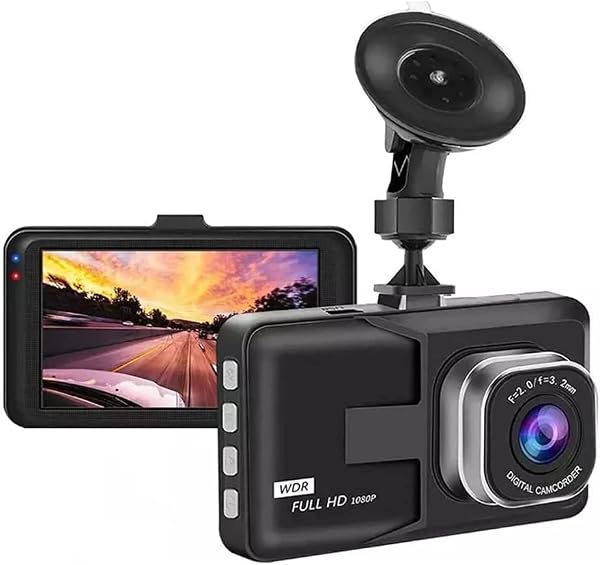
Learning how to setup & use best dash cam no WiFi: Top Picks for 2026 is essential for drivers who prioritize data privacy and simple, reliable operation over app-heavy features.
This guide is designed for the practical motorist who prefers a "set-it-and-forget-it" security solution. It assumes a basic comfort level with automotive electronics but does not require advanced technical skills to execute the installation or maintenance workflows.
By the end of this guide, you will be able to install a non-WiFi dash cam, configure loop recording settings, manage your SD card media effectively, and troubleshoot common playback issues without needing a smartphone application.
- Understanding why offline recording enhances privacy.
- The importance of selecting high-endurance memory cards.
- Step-by-step physical installation for hardwired and cigarette-plug units.
- Configuring resolution and G-sensor sensitivity without mobile apps.
- Retrieving and archiving footage via card readers.
Overview & Prerequisites

Required Hardware and Tools
To begin, you will need the dash cam unit, a dedicated high-endurance microSD card, a trim removal tool for cable management, and a power source (either a 12V cigarette lighter adapter or a hardwire kit). Unlike app-connected models, these devices rely entirely on their onboard physical display or button interface.
Who This Guide Is For
This guide is for those interested in the ultimate guide to offline recording and privacy. If you want a system that operates independently of clouds and internet connectivity, you are in the right place.
Always verify your dash cam's maximum supported storage capacity before purchasing a microSD card, as some older models may not recognize cards larger than 128GB.
Core Concepts & Fundamentals

The Philosophy of Offline Recording
Offline dash cams operate by continuously writing data to a circular buffer known as loop recording. When the memory card fills up, the camera automatically overwrites the oldest footage. This method ensures that the device is always ready to record without manual intervention.
Understanding Onboard Navigation
Since these devices lack WiFi, you must rely on the menu system controlled by physical buttons on the device chassis. Familiarizing yourself with the LCD screen or, in the case of Viidure dash cam offline operation, simple indicator LEDs is crucial for verifying that the device is recording successfully.
| Feature | Incorrect Mental Model | Correct Mental Model |
|---|---|---|
| Media Access | Waiting for app sync | Physically moving SD card to reader |
| Settings | Adjusting in a smartphone app | Using camera buttons/onboard UI |
| Updates | OTA WiFi updates | Firmware flash via microSD card |
Step-by-Step Execution Guide

Phase 1: Installation and Powering
Phase 2: Configuration and Management
Best Practices & Pro Tips
Maintaining Hardware Longevity
MicroSD cards are consumable components. Because dash cams write to them constantly, they eventually fail. A pro tip is to format your card once a month to prevent file fragmentation. Review Fitcamx dash cam specifications for insights on compatible high-speed storage standards.
Managing Data Security
Keep a spare microSD card in your glove box. If you ever need to turn over footage to authorities after an accident, you can swap the card immediately and keep your recording cycle uninterrupted.
Troubleshooting & Common Pitfalls

Solving Connectivity and Storage Issues
If your camera is not recording, the most frequent cause is a corrupted SD card. Always try reformatting the card in the camera menu first. If that fails, the card may have reached its write-cycle limit and requires replacement.
Physical Component Failures
If the device keeps resetting, check your power connection. Loose cables are a common point of failure for dash cams without internal batteries or those with depleted capacitors. You can compare Best Dash Cam No WiFi vs alternatives to see which models offer more robust power management.
Frequently Asked Questions
Can these cameras function without a screen?
A: Yes, many non-WiFi cameras use simple LED indicators to signal that they are actively recording.
How do I view my footage?
A: You must remove the microSD card and insert it into a computer using a USB card reader to play files.
Does the camera record while parked?
A: Many models support parking mode, but this typically requires a hardwire kit to provide continuous power.
Are there legal issues with not having WiFi?
A: No, the lack of internet connectivity actually improves your data privacy and security profile.
How often should I format the SD card?
A: It is recommended to format your card once a month to ensure the file system remains error-free.
Can I use a standard 32GB card?
A: While it will work, high-endurance cards are specifically designed to handle the constant, repetitive writing that dash cams require.
Why is my dash cam recording in small 3-minute clips?
A: This is intentional; it ensures that if a file becomes corrupted, you only lose a small segment rather than the entire recording.
Is a professional installation required?
A: Most users can install these units themselves using basic hand tools, though hardwiring may require automotive electrical knowledge.
Key Takeaways
- 1 Offline dash cams provide superior privacy by keeping data entirely on the device.
- 2 High-endurance microSD cards are the most important investment for reliability.
- 3 Physical button interfaces replace the need for complex smartphone apps.
- 4 Regular card formatting significantly reduces the risk of file corruption.
- 5 Hardwiring is recommended for those wanting to utilize automatic parking surveillance.
- 6 Always test your G-sensor settings to balance sensitivity and storage usage.
- 7 Keep a spare memory card handy to ensure zero downtime during incident reporting.
Conclusion
Mastering the use of a dash cam without WiFi offers a streamlined and secure way to protect yourself on the road. By following these methodical setup and maintenance steps, you ensure that your device remains a reliable witness for every journey.
As you become more comfortable with your device, you will find that the lack of connectivity is a feature, not a limitation. It eliminates software glitches and ensures your personal footage remains under your exclusive control.
Take control of your data privacy and enjoy the confidence that comes with a robust, offline recording system.
📌 Pillar Resource: Read our complete main Best Dash Cam No WiFi: Top Picks for 2026 guide for in-depth insights.