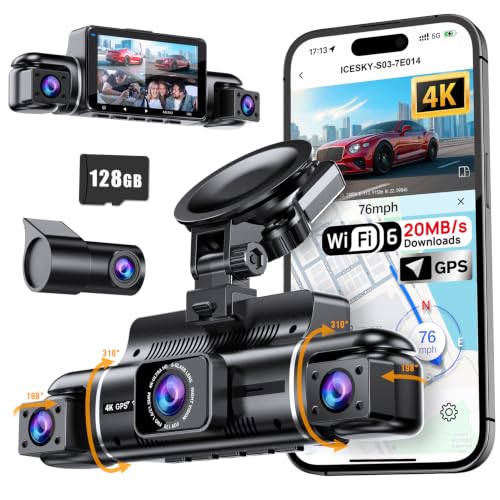
When considering modern vehicle recording technology, a common question arises: Do You Have To Have A Smart Phone For Dash Cams to ensure proper operation? The short answer is that while many premium models utilize smartphones for advanced features, core recording functionality often operates independently.
This guide is designed for both tech-savvy drivers and those who prefer a "set it and forget it" approach. We assume a foundational understanding of basic car electronics but provide detailed instructions that don't require advanced technical certification.
By the end of this guide, you will be able to determine if a wireless-dependent model is right for you, learn how to bypass phone requirements for standard recording, and understand the trade-offs between app-integrated and standalone systems.
- Distinction between "essential" and "convenience" features.
- Methods for viewing footage without a smartphone.
- Hardware dependencies of modern dash cam systems.
- How to handle initial device configuration offline.
- When to upgrade to a smartphone-integrated system.
Overview & Prerequisites

Determining Your Device Needs
Understanding whether you need a phone depends heavily on the model you purchase. Basic, budget-friendly dash cams often feature a built-in LCD screen, meaning you can manage settings and review playback directly on the device. However, high-end "stealth" cams often strip away screens to save space, mandating a smartphone for setup.
Tools and Hardware Required
To operate most systems, you will need a reliable Class 10 MicroSD card, a consistent power source (hardwire kit or 12V outlet), and optionally, a card reader for PC or Mac. You can find comprehensive hardware recommendations in our Best wireless car camera: Top-rated picks for seamless, cable-free recording guide.
Tip: If you do not have a smartphone, always prioritize purchasing a dash cam that includes an integrated display or an HDMI-out port to avoid accessibility issues during configuration.
Core Concepts & Fundamentals

The Role of Smartphone Connectivity
Smartphone apps for dash cams primarily serve as a bridge for two tasks: changing settings (resolution, loop recording length) and downloading footage wirelessly via Wi-Fi. Many modern Fitcamx 4K Dash Cam Long Term Review 2026 Complete Specifications, Sizing & Features designs rely entirely on this interface.
Offline Operation Principles
The fundamental logic of a dash cam is the "Circular Recording" loop. This process is hardware-based and does not require external software. As long as the device has power and a memory card, it will record regardless of phone availability. Connectivity is an enhancement, not a mechanical requirement for the camera to capture video.
| Feature | Smartphone Dependent | Standalone Unit |
|---|---|---|
| Configuration | Via App | On-screen Menu |
| Footage Retrieval | Wi-Fi Transfer | SD Card Reader |
| Display | Mobile Screen | Integrated LCD |
Step-by-Step Execution Guide

Preparation Phase
Before installing your hardware, identify your configuration method. If the device lacks a screen, ensure you have a secondary device (tablet or phone) available for the initial setup. For a deep dive into configuration workflows, read Step-by-Step: How to Setup, Configure & Master Fitcamx 4K Dash Cam Long Term Review 2026.
Execution Phase
Recommended Equipment & Solution

Speederlash 256GB Micro SD Card with Adapter
A reliable pick for Speederlash 256GB Micro SD Card, selected based on this article's guidance.
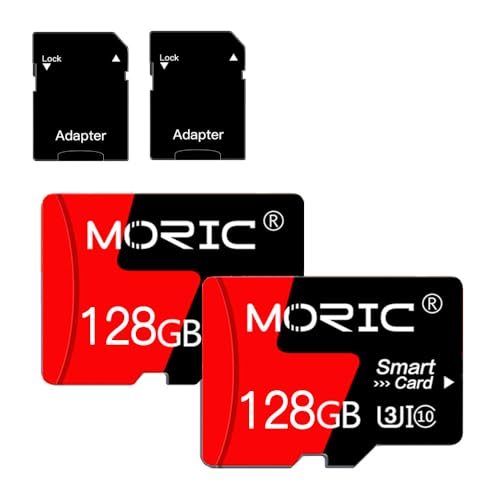
MORIC 2 Pack 128GB Micro SD Card
A reliable pick for MORIC 2 Pack 128GB Micro, selected based on this article's guidance.
Best Practices & Pro Tips
Maintaining Your Recording System
Regardless of your use of a phone, consistency is key. We recommend checking your SD card for integrity once a month. Even if you use an app to view files, manually inspecting the card prevents data corruption from going unnoticed.
Pro-Level Refinements
Troubleshooting & Common Pitfalls

Solving Connection Failures
If you rely on an app and it fails, don't panic. The camera is likely still recording. For specific resolutions to common software issues, see 7 Common Problems with Fitcamx 4K Dash Cam Long Term Review 2026 (and Quick Fixes).
Warning Indicators
Frequently Asked Questions
Do all dash cams require an app?
A: No, many models feature screens and physical buttons for full manual configuration.
Can I download footage without a phone?
A: Yes, you can remove the SD card and use an adapter on any computer or laptop to move files.
Does a lack of phone connection stop recording?
A: Never; the recording function is completely independent of wireless connectivity features.
Is an app safer than a physical screen?
A: It is often more convenient for sharing clips, but physical screens are often more reliable in extreme temperature ranges.
Can I use a tablet instead of a phone?
A: Yes, most apps work on tablets, though it may be less ergonomic to carry a tablet inside a vehicle.
How do I fix time/date errors without an app?
A: Access the settings menu via the camera’s own interface or via a configuration text file on the SD card.
Do I need mobile data to use the app?
A: No, the app communicates with the camera via a local Wi-Fi signal generated by the dash cam itself.
What if my dash cam has no screen and no app?
A: Some basic cameras come with a PC-based configuration tool; check the manufacturer website for utility software.
Key Takeaways
- 1 Smartphone connectivity is optional for the core recording loop.
- 2 Standalone models with screens are ideal for users who dislike mobile apps.
- 3 MicroSD cards are the universal storage medium for all dash cams.
- 4 Always verify date and time settings to ensure legal footage validity.
- 5 Use high-endurance memory cards to prevent data loss.
- 6 Wi-Fi apps operate on a local signal, not your cellular data plan.
- 7 Regular manual file backups are superior to relying solely on app-based storage.
Conclusion
You do not have to have a smart phone for dash cams to function effectively as a recording device. While smartphones significantly improve the user experience through wireless sharing and real-time viewing, they are an extension of the camera's capability rather than a requirement for its core operation.
If you prefer simplicity, choose a model with an integrated LCD. If you prefer a clean aesthetic, a phone-dependent model is perfect, provided you are comfortable with basic app navigation. For more advice on choosing the right device, check out our guide on Auto Vox S36 Max Review: Best Wireless Backup Cameras Compared.
Mastering your dash cam’s offline functionality ensures you remain protected on the road, regardless of your phone's battery life or app connectivity.