Selecting a dash cam without speed recording is an essential decision for drivers who prioritize privacy or wish to avoid the potential legal implications of automated velocity tracking.
This guide is designed for car owners, privacy-conscious commuters, and those seeking to simplify their video evidence without secondary telemetry data. We assume a baseline understanding of vehicle electronics, though no advanced engineering skills are required.
By the end of this guide, you will be able to identify compliant hardware, perform a clean installation, and verify that your system is not capturing sensitive speed data.
- How to identify devices with disabling features.
- Understanding why manufacturers bundle GPS with speed data.
- Methods to verify your dash cam settings.
- Hardware alternatives for stealth operation.
- Legal considerations regarding video-only recording.
Overview & Prerequisites

Defining Your Requirements
Many drivers seek a dash cam without speed recording to prevent personal data from being used against them in traffic incidents. Before purchasing, it is important to understand that many modern cameras include GPS solely for location stamping; however, these often hard-code speed into the video overlay. You must seek models that specifically offer an "Overlay Off" or "Speed Stamp Disable" toggle in the firmware settings.
Essential Tools for Setup
To begin, ensure you have a compatible high-endurance microSD card, a trim removal tool for cable management, and a clean workspace. If you plan to use advanced power modes, Do dash cams record when the car is off? Everything You Need to Know for 24/7 Security is a critical resource to read before finalizing your hardware choice.
Always verify the camera’s manual for a 'GPS off' mode before finalizing your purchase, as some units cannot function without the GPS module attached.
Core Concepts & Fundamentals

GPS vs. Speed Overlay
Understanding the difference between GPS tracking and speed overlay is critical. Many systems utilize GPS for location and date-time synchronization. While the location data is often useful for insurance claims, the speed stamp is a distinct data layer. High-quality systems allow you to retain GPS coordinate data while toggling the speed readout to 'Off' within the display settings.
The Privacy-First Hardware Model
Some users prefer to avoid GPS entirely. By selecting non-GPS hardware, you guarantee that no speed or location telemetry is being recorded or embedded in your video files. For a broader understanding of how these devices function, you might consider reviewing How Does Baby Car Camera Work? Top 5 Systems for 2026 Reviewed for structural similarities in lens and sensor technology.
| Feature | GPS with Speed | No Speed Recording |
|---|---|---|
| Evidence Type | Video + Telemetry | Video Only |
| Privacy Risk | High (Speed logging) | Low |
| Legal Utility | High | Moderate |
Step-by-Step Execution Guide

Initial Configuration Phase
Once you have selected a device that supports a 'Speed Off' function, the configuration begins with the firmware. Ensure the device is updated to the latest 2026 firmware version provided by the manufacturer.
Execution and Mounting
Recommended Equipment & Solution

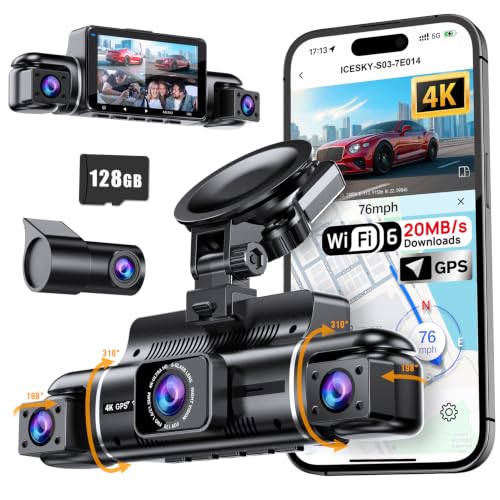
FAIMEE 4K Dash Cam Front and Rear
A reliable pick for FAIMEE 4K Dash Cam Front, selected based on this article's guidance.
Icesky 4K Dash Cam Front and Rear
A reliable pick for Icesky 4K Dash Cam Front, selected based on this article's guidance.
Best Practices & Pro Tips

Maintaining Privacy Integrity
Even with speed recording disabled, you should periodically verify that firmware updates haven't reset your preferences. Manufacturers sometimes push updates that revert settings to factory defaults.
Enhancing Data Security
For those interested in maintaining long-term records, check 5 Best Spare Dash Cam Battery Options for Long-Lasting Parking Mode to keep your camera operational without relying on car power during ignition cycles.
Troubleshooting & Common Pitfalls
Solving Metadata Leakage
If you discover speed data is still appearing, it is likely being stored in the EXIF metadata of the file rather than the video overlay. You may need to use a third-party metadata scrubbing tool.
Hardware Compatibility Issues
If your device insists on recording speed despite your settings, consider moving to a model that allows the physical disconnection of the GPS module.
Frequently Asked Questions
Can I hide the speed on all dash cams?
A: No, only models that include a specific setting for 'Speed Stamp Off' allow this control. Many budget models force the speed readout as a permanent feature.
Does removing the GPS fix the speed recording?
A: Yes, if the GPS module is detachable, removing it will prevent the camera from acquiring speed data, effectively disabling the speed stamp.
Will I lose evidence quality if I turn off speed?
A: Not at all. Turning off the speed stamp only removes the text overlay on your video footage; the video resolution and frame rate remain exactly the same.
Is it illegal to disable speed recording?
A: Generally, no. Most jurisdictions do not require dash cams to log speed; they only require accurate video representation of incidents.
Do all GPS-enabled cameras record speed?
A: Most do, but some allow you to keep the GPS location data for mapping while choosing to hide the numerical speed value in the overlay.
How do I check my dash cam's metadata?
A: Use media player software on your computer, such as VLC, to view file information and verify if speed tags are present in the EXIF data.
Can a lawyer request my dash cam speed data?
A: If the data is on the SD card, it can be subject to discovery in some legal jurisdictions, which is why many drivers prefer to avoid logging it entirely.
Are dash cams without speed recording harder to find?
A: They are common, but you must check the technical specifications for "Speed Display Toggle" or "GPS Stamp Configuration" before buying.
Key Takeaways
- 1 Always verify if the 'Speed Stamp' toggle is available in the camera menu.
- 2 Physically disconnecting the GPS module is the most reliable way to prevent speed data.
- 3 Firmware updates may reset your privacy settings to factory defaults.
- 4 Metadata scrubbing tools can remove embedded speed data from video files.
- 5 Always perform a test recording and review it on a computer screen.
- 6 Formatting your SD card directly in the camera prevents potential file errors.
- 7 Prioritize camera models that explicitly state 'Speed Stamp Disable' on the box.
Conclusion
Choosing a dash cam without speed recording is a proactive step toward protecting your privacy while still benefiting from the security of a reliable witness on the road. By selecting the right hardware and confirming your settings through periodic testing, you can ensure your video evidence remains strictly visual.
Understanding these settings ensures you have full control over the telemetry data your device collects and stores. Continue refining your setup by staying informed about firmware changes and best practices for vehicle security.
Take control of your data today by auditing your current dash cam configuration.