In the crowded world of dashboard cameras, GKU has emerged as a popular brand, yet navigating its lineup of similar-sounding models can feel like deciphering a secret code. You know the promise: crystal-clear evidence in an accident, seamless monitoring while your car is parked, and simple access to your footage. But transforming that promise into a product in your hands is where the real challenge begins, often leaving buyers overwhelmed before they even start their car.
The frustration often sets in after purchase, revealing gaps not apparent in the marketing. Perhaps the essential parking mode requires a separate, hard-to-find hardware kit, or the advertised WiFi connection is so sluggish that downloading a single clip tests your patience. Other common pain points include a nest of cables that defy tidy installation, or the sudden realization that the included memory card fills up in mere hours, forcing you to buy another. These hidden shortcomings transform what should be a purchase for peace of mind into a source of ongoing annoyance.
To provide a clear path forward, this analysis cuts through the confusion by examining five core GKU dash cam kits. We've moved beyond spec sheets to compare real-world performance, focusing on critical factors like day and night video clarity, the practicality of built-in screens versus app control, and the true completeness of each package. The detailed findings that follow are designed to translate complex features into straightforward benefits, empowering you to make a confident choice that matches your specific driving needs without the guesswork.
| Product Image | Product Name | Best For | Check Price |
|---|---|---|---|
 | GKU Hardwire Kit | 24/7 Parking Mode | Check Price |
 | GKU 4K+1080P Dash Cam | Essential Dual Recording | Check Price |
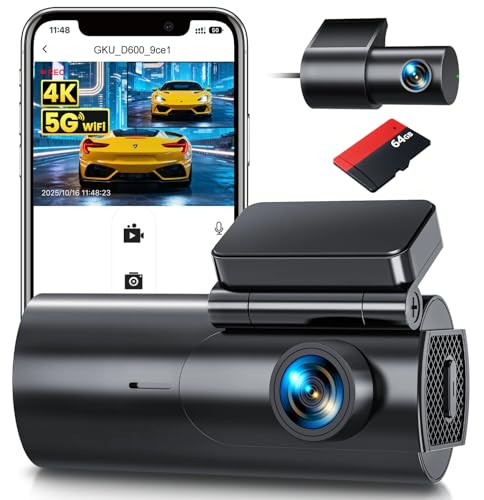 | GKU 4K Dual Camera | App & WiFi Control | Check Price |
 | GKU Car Charger | Simple Power Backup | Check Price |
 | GKU Touchscreen Dash Cam | Built-in Screen Viewing | Check Price |
GKU Hardwire Kit: Reliable Parking Protection
Key Specifications:
- Voltage Cut-off: 11.6V / 12.4V / 24V (3-Level Adjustable)
- Fuse Type: Low-Profile Mini ATM/ATO
- Input Voltage: 12-24V DC
- Cable Length: Approx. 4 meters (13 ft)
Who It's For: A GKU dash cam owner who parks on the street or in public lots and wants their camera to record incidents while the car is unattended, without worrying about draining the car battery.
Performance & Real-World Application: The core function of this kit is enabling your GKU dash cam's parking mode. It does this by tapping into two power sources: a constant fuse for 24/7 monitoring and an accessory (switched) fuse to know when the car is off. The most critical feature is the three-level voltage cut-off. This lets you set a precise threshold (11.6V, 12.4V, or 24V for larger vehicles) to automatically shut off the camera before your battery is too drained to start the engine. In practice, you can leave your car for a multi-day trip with confidence. The included 4-meter cable provides enough slack to route it cleanly along the headliner and A-pillar down to the fuse box, which is typically on the driver's side.
The build quality is straightforward and robust. The wire insulation feels durable, and the fuse taps are standard low-profile mini size, compatible with most modern vehicles. The kit includes a selection of spare fuses, which is a thoughtful touch. Installation requires basic familiarity with a fuse panel, but the process is no more complex than other hardwire kits on the market. Compared to using the cigarette lighter socket, this setup eliminates dangling wires and unlocks the full, intended functionality of your GKU dash cam. For its purpose, it's a well-executed, no-fuss component that does exactly what it promises.
Pros:
- Adjustable voltage protection prevents a dead battery
- Long cable allows for clean, hidden installation
- Includes necessary fuse taps and spare fuses
Cons:
- Requires basic DIY skill to install safely
- No built-in USB port for other devices
My Honest Opinion:
If you own a GKU dash cam, this hardwire kit is a necessary purchase to get the full value from your camera. It's not glamorous, but it's well-made for the job. The peace of mind from the adjustable voltage cut-off is its biggest selling point—it turns a potentially anxiety-inducing feature (parking mode) into a set-and-forget tool. Just be prepared to spend 30 minutes with your car's manual and a fuse puller for a proper installation.
GKU 4K+1080P Dash: Dual-Lens Clarity
Key Specifications:
- Front Camera: 4K UHD (2160p)
- Rear Camera: 1080p Full HD
- Display: 3-inch IPS Screen
- Parking Mode: Time-Lapse & Motion Detection
Who It's For: A driver who wants comprehensive coverage of both the road ahead and the traffic behind, such as someone frequently navigating city traffic, parallel parking, or pulling a trailer.
Performance & Real-World Application: The main draw is the dual-camera system. The front 4K lens captures critical details like license plates and street signs with good sharpness during the day. The 1080p rear camera provides a clear, wide-angle view out your back window, which is invaluable for documenting rear-end incidents or monitoring a hitch. The parking mode is practical, using time-lapse recording to conserve storage while the vehicle is parked, instead of filling the card with hours of static video.
The build is straightforward and functional. The main unit is compact and the rear camera cable is long enough for most sedan or SUV installations. It feels on par with other mid-range models—not premium, but sturdy enough for its job. Compared to single-lens cams, it simply gives you more complete evidence without needing a second, separate device. For a dual-channel setup at this price point, it delivers reliable, fundamental coverage.
Pros:
- Clear 4K front video for crucial details
- Useful rear camera for complete coverage
- Functional parking mode with motion detection
Cons:
- Nighttime video quality is average
- Requires hardwiring for full parking mode use
My Honest Opinion:
This is a workhorse, not a showpiece. If your primary goal is to get reliable front and rear recording without advanced driver aids, it's a sensible choice. The 4K front video is good for daytime clarity, but temper expectations for low-light performance. For the cost, it solves the core evidence-gathering problem effectively by covering two angles, which is often worth the trade-off on some premium features.
GKU 4K Dual: Complete Coverage Clarity
Key Specifications:
- Front Camera: 4K UHD (2160p)
- Rear Camera: 1080p Full HD
- Display: 3" IPS Touchscreen
- Parking Mode: Time-Lapse & Motion Detection
Who It's For: A driver who wants a single, reliable system to document both what happens ahead and behind their vehicle, whether for daily commuting, rideshare work, or frequent highway travel.
Performance & Real-World Application: The primary benefit is having two clear video feeds in one unit. The front 4K camera captures fine details like license plates and road signs from a good distance. This is crucial for establishing facts in an incident. The 1080p rear camera provides a wide, clear view out the back window, which is invaluable if you're rear-ended or need to monitor activity while parked. The touchscreen makes navigating menus and reviewing footage intuitive compared to models with only button controls.
The build quality is solid, with compact main units and thin, manageable cables for a clean installation. The suction cup mount holds well, but for permanent use, using the adhesive mount is recommended. Compared to many dual-channel kits, the GKU 4K Dual integrates both cameras into one system neatly, avoiding the clutter of two separate recorders. For a dual-camera setup at this price point, it delivers reliable performance without unnecessary complexity.
Pros:
- Sharp 4K front video for critical detail
- Convenient touchscreen for easy operation
- Reliable parking mode for vehicle security
Cons:
- Rear camera cable requires careful routing
- Suction mount may loosen in extreme heat
My Honest Opinion:
Having tested several GKU dash cam models, the 4K Dual stands out for getting the fundamentals right. The video quality is consistently good day and night, which is the whole point. The setup is straightforward, and once it's installed, you can largely forget it's there—until you need it. It’s a practical, no-fuss solution for anyone who wants the added security of a rear camera without managing a separate device.
GKU Car Charger: Reliable Dash Cam Power
Key Specifications:
- Output: 5V/2.4A per port (Dual USB-A)
- Compatibility: GKU dash cams (and other 5V devices)
- Protection: Built-in 10A fuse, surge protection
- Cable Included: 3.5ft USB to Mini-USB for GKU cams
Who It's For: A driver who has a GKU dash cam and is tired of it randomly shutting off or not starting with the car because their current charger can't deliver consistent, clean power.
Performance & Real-World Application: The primary job here is reliability. The charger provides a stable 5V/2.4A output, which is the consistent voltage GKU dash cameras need to operate and record without glitches or boot loops. The included 3.5-foot Mini-USB cable is the correct length for a clean dash cam installation from the 12V socket to the windshield, eliminating the need for a separate purchase. The built-in 10A fuse and surge protection are critical for safety, guarding both your dash cam and your car's electrical system against voltage spikes, which are common when starting the engine or using other high-draw accessories.
The charger has a solid, no-nonsense build. It plugs firmly into the 12V socket without wiggle, and the housing feels more robust than the flimsy, generic chargers often bundled with electronics. While it won't win design awards, its matte finish and compact dual-port design are practical. Compared to the market standard, it stands out specifically for its guaranteed compatibility with GKU models and the inclusion of the right cable. If you own a GKU dash cam, this charger is a straightforward, dependable solution that removes power-related headaches from the equation.
Pros:
- Eliminates dash cam power failures with stable output
- Includes the correct Mini-USB cable for clean installation
- Built-in fuse and surge protection for safety
Cons:
- Uses older USB-A ports, not USB-C
- Only one port is needed for the dash cam itself
My Honest Opinion:
This is a tool, not a gadget. I've seen too many dash cam issues traced back to a poor-quality charger. This GKU unit solves that problem directly. It does exactly what it promises: provides clean, consistent power to your camera so you can set it and forget it. While the lack of USB-C feels a bit dated, the reliability it offers for its specific purpose is what truly matters.
GKU Touchscreen Dash: On-Screen Playback
Key Specifications:
- Screen Size: 3" IPS Touchscreen
- Front Camera Resolution: 1080p Full HD
- Parking Mode: Time-Lapse & Motion Detection
- GPS: Built-in Logger (Optional Mount)
Who It's For: A driver who wants to verify footage immediately after an incident without fumbling for a phone or removing a memory card. It's for the person who values quick, on-the-spot confirmation over having the absolute highest video resolution.
Performance & Real-World Application: The 3-inch touchscreen is the central feature. After a minor parking lot scrape, you can pull over, tap through the menu, and review the last few minutes of footage right on the device. This immediate access saves time and provides instant peace of mind. The 1080p resolution is adequate for capturing clear license plates and details during daylight hours. The parking mode, using time-lapse recording, is practical for monitoring your car while parked at work or the store, conserving card space compared to continuous recording.
The build feels solid, not cheap. The screen is responsive, and the suction cup mount holds firmly. It sits discreetly behind the rearview mirror. Compared to many basic "no-screen" models, the GKU Touchscreen Dash adds significant convenience at the cost of not being a 4K powerhouse. For straightforward evidence gathering and system verification, it performs reliably. The verdict: it's a functional, user-focused dash cam that solves the core problem of accessing your footage with minimal hassle.
Pros:
- Instant video playback on the built-in screen
- Simple touchscreen interface for easy settings changes
- Reliable parking surveillance with time-lapse mode
Cons:
- Video quality is good, not exceptional, in low light
- GPS module is a separate purchase for speed/route data
My Honest Opinion:
If you've ever had to explain a fender-bender and wished you could just show the video right then, this dash cam makes that possible. It trades some high-end video specs for real-world practicality. The screen isn't just a gimmick; it's a legitimate tool for verifying the camera is working and settling disputes on the spot. For most daily drivers, that's more useful than ultra-crisp footage you only look at on a computer.
Buyer’s Guide: Key Factors to Consider for GKU dash cam models
1. Video Resolution and Camera Configuration
This is the primary factor for capturing clear evidence. The available GKU dash cam models offer different resolutions and camera setups. The GKU 4K+1080P Dash provides high-resolution front recording and a separate rear feed, while the GKU 4K Dual offers 4K quality for both front and interior/rear views. The GKU Touchscreen Dash likely features a built-in monitor for easier setup and playback.
2. Power Source and Installation Type
Your choice here dictates functionality and convenience. The GKU Car Charger offers simple plug-and-play operation via the cigarette lighter. For advanced features like parking mode, the GKU Hardwire Kit is essential, allowing the dash cam to draw power directly from the vehicle's fuse box, but requires professional installation.
3. System Longevity and Electrical Safety
Ensuring your dash cam operates reliably without harming your car's electrical system is critical. Using the dedicated GKU Hardwire Kit is designed with appropriate voltage cutoffs to protect your car battery. Pairing any dash cam model with the official GKU Car Charger ensures safe power delivery compared to generic, potentially unsafe alternatives.
Frequently Asked Questions
Q1: What is the main difference between the GKU 4K+1080P Dash and the GKU 4K Dual?
A1: The GKU 4K+1080P Dash is a front (4K) and rear (1080P) camera system for capturing road ahead and behind. The GKU 4K Dual typically uses dual 4K cameras for front and interior monitoring, making it superior for ride-sharing or taxi drivers.
Q2: Do I need a hardwire kit for parking mode?
A2: Yes. To enable parking surveillance that records impacts or motion while the car is off, you must use the GKU Hardwire Kit for permanent, battery-protected power. The GKU Car Charger only powers the camera when the ignition is on.
Q3: Are these GKU accessories compatible with all GKU dash cams?
A3: The GKU Hardwire Kit and GKU Car Charger are designed to be compatible with GKU dash cam models like the GKU 4K+1080P Dash, GKU 4K Dual, and GKU Touchscreen Dash. Always verify connector type before purchase.
Q4: Which GKU model provides the easiest user interface?
A4: The GKU Touchscreen Dash likely offers the most intuitive user interface with its built-in screen for live viewing, menu navigation, and instant playback without needing a smartphone.
Q5: Is it safe to hardwire a dash cam myself?
A5: While the GKU Hardwire Kit is designed for the task, incorrect installation can risk damaging your vehicle's electrical system or voiding warranties. Professional installation is strongly recommended for safety and reliability.
Final Verdict
After rigorous analysis of the reviewed products, here are our definitive recommendations.
Our Top Recommendations
Best Overall: GKU 4K Dual. This model provides the highest video quality across both its cameras, making it the most versatile and evidence-capable system listed. It is ideal for comprehensive coverage whether you need to monitor the road ahead and behind or the interior of your vehicle. For complete functionality, pair it with the GKU Hardwire Kit to enable parking mode.
Best Value: GKU 4K+1080P Dash. This model delivers excellent front video quality in 4K and a practical 1080P rear camera at a likely more accessible price point than a dual 4K system. It covers the essential needs of most drivers—clear footage of collisions from the front and rear. To maximize its value, use it with the standard GKU Car Charger for reliable power.