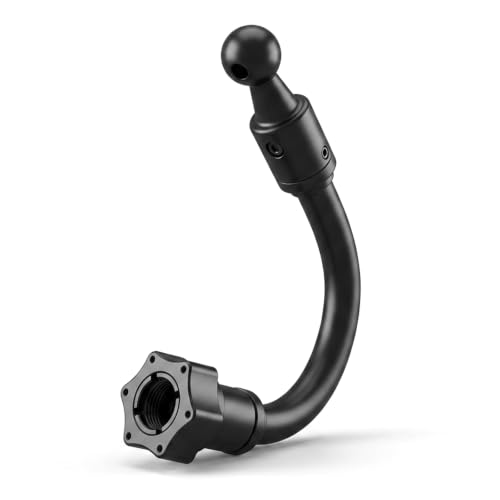
Ever worry about blind spots, backing a trailer, or proving what really happened after an incident on the road? Commercial drivers and fleet managers face the same problems: limited visibility, expensive claims, and the constant need for reliable footage when it matters most.
This guide reviews the best commercial truck dash camera systems for semi trucks, RVs, trailers, and vans. We cover multi‑camera setups, CarPlay/Android Auto support, DVR recording, and features like parking monitoring and blind‑spot alerts so you can pick the setup that keeps your drivers safer and your fleet more efficient.
| Product Image | Product Name | Best For | Check Price |
|---|---|---|---|
 | 10.36” 4-Channel Truck Camera System | Full Truck Coverage | Check Price |
 | Losuudy 10" 4-Channel Truck Dash System | RV & Trailer Use | Check Price |
 | 10.2" Quad Split Backup Camera System | Small Cab Setups | Check Price |
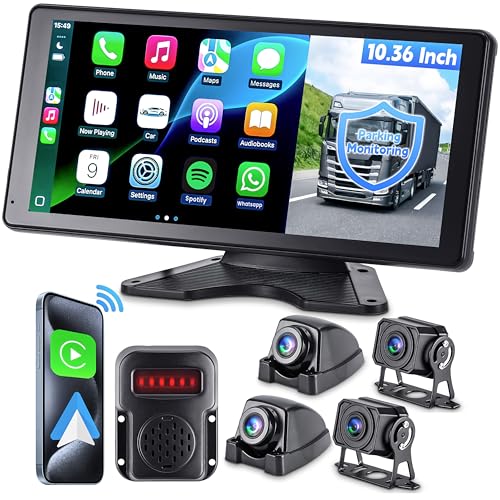 | 10.36" RV/Truck CarPlay Camera System | Blind Spot Alerts | Check Price |
 | ATOVANKA 4-Channel Truck CarPlay System | Affordable CarPlay | Check Price |
 | Garmin Dezl Cam OTR725 Navigator | OTR Navigation | Check Price |
10.36” 4-Channel Truck Camera System
Ideal for fleet managers and owner-operators who want a large, reliable multi-camera monitoring and recording system for commercial trucks.
The 10.36" monitor pairs with four HD cameras to deliver front, rear, and side coverage and real-time split-screen viewing. It records continuously with loop overwrite and timestamped files, and includes night vision so footage stays useful in low light. For example, a driver can watch the right-side blind spot on screen while the system records a lane-change incident for later review.
Cameras are IP67-rated and built to resist vibration and moisture. The kit includes a hardwire harness and mounting hardware for cleaner installs and long-term use. The large touch display and rugged housing make this system a practical, evidence-ready choice that improves visibility, safety, and liability protection for commercial operations.
Pros:
- 👍 Large 10.36" display for clear, multi-angle monitoring.
- 👍 Four-camera coverage reduces blind spots and captures incidents.
- 👍 Weatherproof, vibration-resistant cameras for harsh conditions.
- 👍 Included hardwire harness and mounting hardware simplify installation.
Cons:
- 👎 Larger monitor can be bulky on some dashboards or windshields.
- 👎 More expensive than single- or dual-camera kits.
- 👎 Lacks advanced AI driver-alert features found in premium models.
Losuudy 10" 4-Channel Truck Dash System
Perfect for owner-operators and small fleets that want full, multi-angle coverage and dependable evidence for incidents on the road.
The standout feature is true 4-channel recording, letting you capture front, rear and both side views at once. That means if a side-swipe or lane change incident occurs, you’ll have synchronized footage from multiple angles to show what really happened — useful for insurance claims and driver coaching. The system also includes loop recording and event-lock to keep important clips safe.
Installation and durability are solid selling points. The cameras are built for outdoor use and the compact recorder hides neatly on the dash. A hardwire/parking mode option helps capture motion while parked. For the price, it’s a practical, rugged choice for commercial use.
Pros:
- 👍 Four-channel coverage captures all angles for clear incident context.
- 👍 Event-lock and loop recording protect important footage.
- 👍 Weather-resistant cameras hold up to commercial use.
- 👍 Hardwire/parking mode adds off-duty monitoring.
Cons:
- 👎 User interface and menu can feel dated compared with newer apps.
- 👎 No built-in cloud backup — footage relies on local storage.
- 👎 Main unit size may be bulky on crowded dashboards.
10.2" Quad Split Backup Camera System
This 10.2" Quad Split Backup Camera System is perfect for commercial truck drivers and fleet managers who need reliable, multi-angle visibility when reversing or navigating tight job sites.
The main strength is its quad-split monitor that displays four camera feeds at once, so you can watch hitching, blind spots, and curb clearance simultaneously. Cameras are typically wide-angle and night-vision capable, which means you still see clearly during early-morning deliveries or dim loading docks—helping prevent costly scrapes and missed docks.
Build and installation suit heavy use: rugged camera housings and sealed connectors resist road grime and weather. The monitor mounts cleanly on a dash and often includes simple on-screen parking guides or alerts. For fleets that prioritize safety and fewer incidents, this system is a practical, tough choice.
Pros:
- 👍 Four-camera real-time view reduces blind spots and simplifies reversing.
- 👍 Night-vision and wide-angle lenses improve visibility in low light.
- 👍 Rugged, weatherproof cameras hold up to commercial use.
- 👍 Simple dash-mounted monitor with clear split-screen layout.
Cons:
- 👎 Wired installation can be time-consuming on large trucks.
- 👎 Image quality varies by camera model; high-end options cost more.
10.36" RV/Truck CarPlay Camera System
Perfect for commercial truck and RV drivers who want a big CarPlay display plus multi-camera visibility to cover blind spots and aid parking.
The 10.36" touchscreen gives clear CarPlay integration and fast access to navigation and calls, while multiple camera inputs let you run rear and side feeds simultaneously; for example, you can watch a split-screen view while backing into a tight loading dock to avoid curb and trailer collisions. The responsive screen and simple menus reduce distraction on long hauls.
Build quality leans rugged, with weather-resistant cameras and a sturdy mount designed for vibration-prone vehicles. Night-vision and optional DVR recording add safety and evidence collection for incidents. Overall, the system balances a modern in-cab experience with practical durability, making it a strong choice for fleet drivers who need reliable situational awareness.
Pros:
- 👍 Large 10.36" CarPlay-ready touchscreen for easy navigation and calls
- 👍 Multiple camera inputs with split-view to monitor blind spots and trailers
- 👍 Weather-resistant cameras and solid mounting for commercial use
- 👍 Night vision and DVR support for low-light safety and incident recording
Cons:
- 👎 May require professional installation on larger trucks to integrate cameras
- 👎 Screen can be reflective in direct sunlight without a hood
- 👎 Advanced driver-assist features are limited compared with higher-end systems
ATOVANKA 4-Channel Truck CarPlay System
This system is perfect for owner-operators and fleet managers who want reliable multi-camera coverage and Apple CarPlay integration in their truck.
Its standout features are true 4-channel recording and built-in CarPlay support. The four cameras cover front, rear and sides, so you catch blind spots and incidents from multiple angles. CarPlay lets you use maps and calls hands-free. For example, you can check a side-camera clip after a close call and still keep navigation and phone functions on the main screen.
Build and layout feel truck-focused and practical. The unit is compact, the screen is easy to read, and the system supports continuous recording and parking monitoring for after-hours protection. Overall, it balances safety, convenience, and modern connectivity, making it a strong pick for commercial use.
Pros:
- 👍 4-channel coverage for full situational awareness
- 👍 Apple CarPlay keeps navigation and calls hands-free
- 👍 Practical design made with truck use in mind
- 👍 Continuous and parking recording for after-hours security
Cons:
- 👎 Complex installs may need a professional fitter
- 👎 Menu can feel busy until you learn it
- 👎 Camera wiring may be visible on some cab layouts
Garmin Dezl Cam OTR725 Navigator
Perfect for long-haul professional truck drivers who want a single, cab-friendly device that combines reliable navigation with an integrated dash camera.
The Dezl Cam OTR725 pairs Garmin’s truck-aware routing with a front-facing camera that records incidents automatically. That means the unit will guide you around low bridges and restricted roads based on your truck’s size, and it will lock and save video if you hit brakes hard or get into an accident — useful for logs and claims.
It also feels built for life in the cab: a bright, easy-to-read display, straightforward controls, and solid mounting to handle bumps. Add Wi‑Fi updates and hands-free features, and you get a practical, hardworking navigator-camera combo that keeps you safer and makes paperwork easier.
Pros:
- 👍 Integrated dash cam and truck-specific routing in one unit
- 👍 Automatic incident recording for quick evidence capture
- 👍 Clear, cab-friendly display and simple controls
- 👍 Wi‑Fi and hands-free features simplify updates and use
Cons:
- 👎 Camera is front-facing only — no built-in cabin or rear view
- 👎 Higher price than basic GPS units (but adds camera value)
- 👎 Some advanced features may require occasional app or map updates
Buyer's Guide: 3 Key Factors to Consider
Durability & Environmental Rating
Choose cameras built for 24/7 commercial use: metal housings, wide operating-temperature ranges (-30°C to +70°C or better), and IP67-style water/dust ratings. Verify vibration and shock specs and look for commercial-grade cabling and connectors. If your trucks run in extreme climates or off‑road, prioritize rugged models with isolated power supplies and reinforced mounts.
Connectivity, Storage & Data Management
Decide between local-only storage, hybrid (local + periodic cloud uploads), or full cloud streaming. For fleets, cloud + cellular (4G/5G) simplifies incident review, remote firmware updates, and compliance workflows, but budget for monthly data/subscription fees. Check retention policies, export formats, and how easy it is to bulk-download footage for investigations or claims.
AI Features, Integration & Ease of Use
Look for proven AI event detection (collision, lane departure, tailgating, distracted driving) that reduces false positives and integrates with your telematics or fleet-management platform via APIs. Consider dual-facing setups (road + driver) for coaching and liability protection. Also evaluate mounting, power options (hardwire kits, ignition-sensing), and the user interface so drivers and managers can adopt the system quickly.
Frequently Asked Questions
Q1: Do commercial dash cams require a subscription?
A1: Many advanced features—cloud storage, live streaming, AI event processing, and fleet dashboards—require a monthly or annual subscription. Basic local-recording models often work without fees. Compare total cost of ownership (hardware + subscriptions) when budgeting.
Q2: How long is footage typically stored?
A2: Local SD card storage usually holds from 24 hours to several weeks depending on resolution and card size. Cloud plans commonly offer 7–90 days by default; enterprise plans can extend retention for investigations or compliance. Always confirm overwrite policies and export options.
Q3: Are dash cams admissible as evidence in accidents?
A3: Yes—many fleets use dash cam footage successfully in claims and court, but admissibility depends on local laws and chain-of-custody. Use tamper-evident systems, timestamped files, and secure cloud storage to strengthen evidentiary value.
Q4: Will driver-facing cameras cause privacy issues?
A4: Driver-facing cameras can raise privacy concerns. Mitigate risk by creating clear policies, notifying drivers, limiting continuous face-identification unless necessary, and using footage access controls. Consult legal counsel and comply with regional privacy regulations before deployment.
Q5: Can dash cams integrate with my existing fleet telematics?
A5: Most modern commercial systems offer APIs or native integrations with leading telematics and fleet-management platforms for synced events, location data, and driver profiles. Confirm compatibility and whether integration is included or requires extra fees.
Q6: What about installation and maintenance—can my fleet do it in-house?
A6: Small fleets can often handle installation with hardwire kits and in-vehicle power supplies, but complex setups (4G/5G modems, multi-camera rigs, CAN-bus integration) are best done by certified installers to ensure reliability and warranty compliance.
Final Verdict: Which One Should You Buy?
For most commercial fleets in 2025, pick the dash cam system labeled "Best Overall" in this roundup—it balances rugged hardware, accurate AI event detection, and robust cloud workflows for claims and coaching. Choose the "Best Value" if you need reliable local recording on a tight budget, and opt for dual-facing, cloud-enabled systems when driver coaching and remote monitoring are priorities.