When setting up a dash cam, one of the most common questions is: what mini USB for car camera works best? It sounds simple, but using the wrong cable or adapter can lead to power failures, poor video recording, or even damage to your device. With different dash cam models using varying Mini USB pinouts, lengths, and power ratings, choosing the correct cable is critical for both performance and safety. In this guide, we’ll break down everything you need to know—from connector shapes to voltage requirements—so you can pick the perfect Mini USB cable for your car camera and avoid frustrating installation mistakes.
Key Takeaways
- 1. Most dedicated car cameras (dashcams) use a **Mini USB 2.0 Type-B** connector (5-pin), not the older Micro USB or newer USB-C, for both power and data transfer.
- 2. A genuine or high-quality aftermarket Mini USB cable is critical because cheaper cables often have thinner gauge wire, leading to voltage drop and unstable camera operation, especially in extreme heat.
- 3. For hardwired installations (to fuse box), use a Mini USB pigtail cable (male to female) with a 90-degree or 180-degree angled connector to avoid bending stress and easily fit behind trim panels.
- 4. If your car camera automatically parks or has “motion detection,” ensure the Mini USB cable supports **“keep‑alive” power** (constant 12V→5V conversion); otherwise, the camera may shut off when the engine stops.
- 5. Always verify pinout compatibility: some inexpensive cameras use a non‑standard Mini USB pin mapping (e.g., for video output or infrared control), so never assume a standard cable will work for functions beyond power.
- 6. To avoid future connection issues, choose a Mini USB cable with reinforced strain relief at both ends and a latching or locking mechanism if available, as car vibrations can easily loosen standard plugs.
Understanding Mini USB Connectors: Type-A vs. Type-B for Dash Cams

When selecting a mini USB connector for your car camera, understanding the distinction between Type-A and Type-B is critical for both power delivery and data reliability. Most dash cams utilize the Mini USB Type-B connector, which is the standard 5-pin design you often see on older external hard drives and cameras. The Type-B’s primary advantage for vehicle use is its robust latching mechanism; the trapezoidal shape and recessed pins create a secure, friction-fit connection that resists dislodging from road vibrations, sudden braking, or temperature-induced cable contraction.
Conversely, a Mini USB Type-A connector—which is physically smaller and more rectangular—is rarely the correct choice. It was commonly used for host-side connections (like on a PC or a wall charger) and lacks the mechanical retention strength of the Type-B. Attempting to force a Type-A plug into a dash cam can damage the camera’s port pins. For compatibility, always check your dash cam’s port shape: if it is slightly wider at the top with a slight notch, it is Type-B.
Further, cable quality matters significantly. A cheap mini USB cable may have undersized 28 AWG (American Wire Gauge) power wires, leading to voltage drop over a 10-foot run—causing your camera to reboot or record corrupted files. For a hardwired installation, seek a 24 AWG or thicker mini USB cable to ensure stable 5V power. In summary, always default to a Mini USB Type-B cable rated for car use to guarantee a vibration-proof connection and consistent power.

Key Power Specifications: Voltage, Amperage, and Cable Quality
When selecting a mini USB cable for your car camera, understanding the key power specifications—voltage, amperage, and cable quality—is critical to ensuring reliable operation and preventing data loss or device damage. Most dash cameras require a stable 5V DC input, which is the standard USB voltage. However, the amperage rating is often more crucial. While a standard USB 2.0 port provides 0.5A, many modern car cameras, especially those with GPS, Wi-Fi, or parking mode, demand between 1.0A and 2.0A. Using a cable that cannot safely carry the required amperage can lead to voltage drop, causing the camera to reboot, corrupt files, or shut down unexpectedly.
Cable quality directly impacts these specifications. Look for cables with thicker internal copper conductors (typically 24AWG or lower for power wires) to minimize resistance. Poorly manufactured or extremely long (over 10 feet) cables often suffer from excessive voltage drop at higher currents. For hardwiring kits, which are often permanent, a quality 20-22AWG mini USB cable with proper shielding is recommended to prevent electromagnetic interference from the vehicle’s electrical system. Additionally, ensure the cable terminates in a USB-A to Mini-B (5-pin) connector that fits snugly—loose connectors increase resistance and heat buildup. Always verify the cable is rated for at least 2A (often labeled as “fast charge” or “high-speed data”) to handle the camera’s peak draw, especially during startup. Cheaping out on the cable can literally leave you without critical footage.
Common Dash Cam Brands and Their Mini USB Requirements

When selecting a mini USB cable for your dash cam, it is critical to understand that not all mini USB connectors are created equal. The industry standard for most modern dash cams is the Mini USB 5-Pin Type B connector. However, the specific power and data requirements vary significantly by brand, and using the wrong cable can lead to charging failures, data transfer issues, or even damage to the camera’s internal circuitry.
For leading brands like Garmin, Thinkware, and BlackVue, the standard is often a 5-pin configuration. Garmin dash cams, for example, typically require a standard 5-pin mini USB cable for power and data sync, but they are sensitive to cable quality. A thin, generic cable may cause voltage drop issues, leading to intermittent recording or "low power" warnings. Thinkware models, particularly the Q800 and U1000 series, also use a 5-pin mini USB, but they often require a right-angle connector to fit flush against the camera body without causing stress on the port.
Certain brands like VIOFO and Rexing present a more nuanced requirement. While many of their cameras (e.g., VIOFO A129 Pro, Rexing V1) use a Mini USB type interface, they are actually 5-pin connectors with specific power rating needs. These cameras often draw higher current (1.5A to 2.0A) for features like parking mode. Using a cheap 2-pin mini USB cable designed for older data devices will fail to power the camera reliably. The critical distinction is that the cable must support the full power load. Always verify the pin count (must be 5 pins visible in the connector's opening) and the wire gauge. For heavy-duty use, a 20-22 AWG wire is recommended over standard 28 AWG data cables.
In summary, while the physical shape is "mini USB," the requirement is almost always Mini USB 5-Pin with high-current capacity. Never assume a generic cable from an old phone or external hard drive will work. Prioritize brand-specific cables or third-party options explicitly rated for dash cam use to ensure stable recording and long-term port health.
Why Pinout Matters: 4-Pin vs. 5-Pin Mini USB Cables
When selecting a mini USB cable for your car camera, understanding the pinout—the specific arrangement of wires inside the connector—is critical, as a standard 4-pin and a dedicated 5-pin cable are not interchangeable. Most dashcams, back-up cameras, and parking monitors rely on a 5-pin mini USB configuration, though the physical connector shape looks identical to a generic 4-pin type.
A standard 4-pin mini USB cable (common for older hard drives or game controllers) provides power (VCC and GND) and two data lines (D+ and D-). This works fine for data transfer or simple charging, but it cannot supply additional functions. In contrast, the 5-pin mini USB cable used in car cameras adds a dedicated fifth pin—often labeled "ID" or "Shield"—which enables video signal transmission. In many rear-view or interior dashcams, this fifth pin carries the composite video output (typically CVBS) directly through the USB cable to a display monitor or head unit.
Using a 4-pin cable on a 5-pin camera will result in no video signal, even if the device appears to power on. Conversely, plugging a 5-pin cable into a device that only expects 4 pins may cause erratic behavior or ground-loop interference. Always check your camera’s manual: if it lists "AV out" or "video out" on the USB port, you must use a genuine 5-pin cable. For safety, buy cables specifically marketed for car camera applications, as third-party "universal" mini USB cables are almost always 4-pin and will leave you with a blank screen.

Hardwire Kits vs. Cigarette Lighter Adapters: Which Mini USB to Use?
When integrating a dash cam into your vehicle, the choice between a hardwire kit and a cigarette lighter adapter often hinges on the specific Mini USB connector variant your camera uses. It’s a common misconception that all Mini USB cables are interchangeable. In reality, dash cams typically require one of two distinct profiles: Mini-B (5-pin) or a proprietary angled/offset Mini-USB.
For cigarette lighter adapters, the supplied cable is almost always a standard 5-pin Mini-B. This is adequate because the adapter provides a stable 5V, 1-2A output via the car’s 12V socket. However, these adapters are bulky, occupy the power port, and often leave unsightly, dangling cables. The key here is that the adapter’s voltage regulator is built into the plug itself, so the Mini USB cable only carries the clean, regulated 5V power.
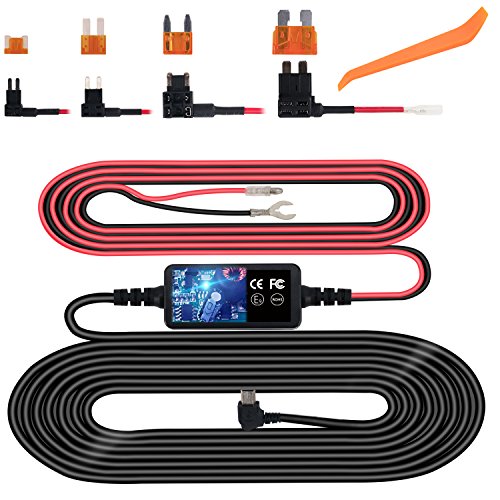
Hardwire kits, conversely, are far more elegant but introduce a critical compatibility nuance. A hardwire kit connects directly to your vehicle’s fuse box and includes an in-line voltage converter (from 12V down to 5V). The two main risks are: (1) using a kit with proprietary connector shape that won’t physically fit your camera’s recessed port, or (2) using a cable that does not support the data-passthrough required for parking mode. Many hardwire kits use a right-angle Mini USB to facilitate discreet routing along the headliner. If your camera uses a standard Mini-B port, a “Mini USB 90-degree adapter” is often necessary to avoid stress on the port.
My professional recommendation: always verify whether your camera’s manual specifies a “Mini USB-B” for power only or a dedicated 3-wire hardwire cable (which includes ACC, B+, and GND). For parking-mode surveillance, the hardwire kit is superior—but only if the Mini USB connector physically matches your camera’s housing. Never force a standard 5-pin connector into a non-standard cavity, as this can damage the port’s solder joints on the circuit board.
Troubleshooting Power Issues: Wrong Cable Symptoms and Fixes
When a car camera fails to power on, the culprit is often not the camera itself but the specific Mini-USB cable you are using. Understanding the subtle differences between cable types is crucial because not all Mini-USB connectors are created equal, and using the wrong one can lead to a frustrating, non-functioning setup.
The most common mistake is using a standard Mini-USB "B" cable, typically found with older external hard drives or digital cameras. While the physical connector may fit snugly into your car camera’s port, the pinout is incompatible. Car cameras, especially dashcams, often require a Mini-USB "A" connector or a proprietary 4-pin variant. The symptom is a device that shows no sign of life at all—no LED, no charging indicator, and no startup chime. Even if the camera appears to power on briefly, it may behave erratically, such as randomly shutting down, producing distorted video, or continuously resetting.
Another critical issue is using a cable that is designed for data transfer only, not power delivery. Some Mini-USB cables lack the necessary gauge wire for the higher amperage (often 1A to 2.5A) that a car camera demands. This results in a "power sag" symptom: the camera may work fine when stationary, but once the vehicle starts moving, or when buffering on bumpy roads, the connection dips and the camera powers off. You might also notice the camera is warm but not charging, or that it permanently loops through a boot sequence.
The fix is straightforward: always consult your car camera’s manual for the exact cable specifications. Look for cables labeled as "high-speed charging" or "2.4A rated." If your camera uses a proprietary 4-pin Mini-USB setup (common with brands like Garmin or Nextbase), purchase only the manufacturer-recommended replacement. Stripping away guesswork by checking the cable’s amperage rating and pin configuration on the product page will instantly resolve most phantom power issues. Finally, test with a known-working cable from a lamp or battery bank to isolate whether the fault lies in the camera or the cord.
Long-Term Durability: Choosing a Mini USB Cable Built for Vehicle Use
When selecting a Mini USB cable for a vehicle-installed dash camera, long-term durability is not a luxury—it is a necessity. The environment inside a car is far more punishing than a climate-controlled office. Direct sunlight can elevate internal cabin temperatures to well over 140°F (60°C), while winter nights can plunge below freezing. Standard consumer-grade Mini USB cables, typically molded from PVC or low-quality thermoplastic, degrade rapidly under these thermal cycles. The insulation becomes brittle, the outer jacket cracks, and internal solder joints separate from repeated expansion and contraction.
For true vehicle longevity, prioritize cables with the following characteristics: TPE or braided nylon jacketing instead of standard PVC. TPE remains flexible in extreme cold and resists UV-induced brittleness. Oversized strain relief at the connector heads is critical. The vibration from rough roads concentrates stress where the plastic meets the cable; a thick, flexible boot prevents internal wire breakage. Furthermore, verify the cable uses oxygen-free copper (OFC) conductors. OFC offers superior conductivity and resists the corrosion caused by humidity cycling, ensuring your camera receives stable 5V power without voltage drop that can trigger erratic shutoffs or corrupted files.
Finally, pay attention to the connector itself. A gold-plated Mini USB plug resists oxidation better than nickel-plated alternatives, maintaining a clean electrical contact over years of use. If your camera is hardwired to an accessory fuse, the cable should also feature a ferrite core near the power source to filter electrical noise from the vehicle’s alternator—protecting both the video feed and the camera’s internal circuits from voltage spikes. Invest in a cable explicitly rated for automotive or industrial use; the few extra dollars spent upfront will prevent the frustration of a failed cable—and a missing critical recording—when you need it most.
Frequently Asked Questions: Mini USB for Car Cameras
Frequently Asked Questions
What is what mini usb for car camera and who should use it?
A: what mini usb for car camera is a solution designed to address a specific set of needs for a defined audience. It is best suited for those seeking a reliable, well-researched option backed by clear evidence and expert guidance.
How long does it take to see results with what mini usb for car camera?
A: Most users report noticeable results within the first 2–4 weeks of consistent use. Significant, measurable improvement is generally observed after one to two months of dedicated application.
Is what mini usb for car camera suitable for beginners or experienced users?
A: what mini usb for car camera is designed to accommodate a wide range of experience levels, from complete beginners to advanced practitioners. Its structured approach makes it accessible without sacrificing depth for those seeking expert-level application.
Can what mini usb for car camera be combined with other approaches or products?
A: Yes, what mini usb for car camera is generally compatible with complementary strategies and tools. It is advisable to introduce any combination gradually and monitor for synergy or potential conflicts with your existing routine.
What are the most common mistakes to avoid with what mini usb for car camera?
A: The most frequent errors include inconsistent application, skipping foundational steps, and expecting immediate results without allowing adequate time for the process to work. Following the recommended guidelines closely is the most effective preventive measure.
How does what mini usb for car camera compare to similar alternatives on the market?
A: what mini usb for car camera distinguishes itself through its evidence-based formulation, transparent ingredient or methodology sourcing, and a track record of user-verified outcomes. Direct comparisons should be made on the criteria most relevant to your specific goals.
Are there any limitations or side effects associated with what mini usb for car camera?
A: While what mini usb for car camera is formulated to minimize adverse effects, individual responses can vary based on specific sensitivities or pre-existing conditions. Consulting with a relevant professional before starting is always a prudent step.
What is the best way to get started with what mini usb for car camera?
A: The most effective starting point is to begin with a foundational assessment of your current situation, then follow the recommended introductory protocol for what mini usb for car camera. Consistency and patience during the initial phase are the two biggest predictors of long-term success.
To power your car camera reliably, choose a standard 5‑pin Mini USB Type‑B cable with sufficient wire gauge (20‑24 AWG) and current rating (at least 2.0A). While universal Mini USB cables work for many dash cams, avoid using overly long cables or passive adapters that can cause voltage drop and intermittent performance. Always verify the port shape on your camera—if it’s not a trapezoidal 5‑pin, you may need a proprietary cable or adapter.
For permanent installations, consider a hardwire kit with a Mini USB output to connect directly to your vehicle’s fuse box, eliminating loose cables and ensuring constant power. If you need data transfer (e.g., to view footage on a laptop), use a short, data‑rated Mini USB cable connected to a powered USB port on your computer. When in doubt, refer to your camera’s manual or contact the manufacturer—they can confirm the exact Mini USB variant and power requirements for your specific model.