Finding a reliable dash cam for under $50 often feels like navigating a minefield of compromises. While the desire for clear video evidence and peace of mind is universal, the fear of grainy footage and flimsy construction is real. Fortunately, the budget tech landscape has evolved dramatically, with today's affordable models offering performance that was unthinkable just a few years ago, making true value now genuinely attainable.
The primary concerns with ultra-low-cost dash cams are well-founded. Many suffer from blurry or pixelated video, especially in critical low-light conditions, rendering license plates unreadable after a sunset incident. Other frequent pain points include frustratingly complex mobile apps, finicky wiring for parking modes that drain your car's battery, and mounts that fail in extreme temperatures. A poorly executed feature is worse than none at all, as it creates a false sense of security when you need dependable operation the most.
To separate the genuine bargains from the mere cheap gadgets, I put five of the most popular sub-$50 models through rigorous real-world testing. My evaluation prioritized essential metrics: crystal-clear daytime video and usable night vision, intuitive app connectivity for easy video retrieval, and truly hassle-free installation. I also scrutinized the practical implementation of bonus features like collision detection and parking surveillance. The results revealed clear winners that deliver core reliability without the premium price tag.
| Product Image | Product Name | Best For | Check Price |
|---|---|---|---|
 | Dash Cam V300 | Compact WiFi Pick | Check Price |
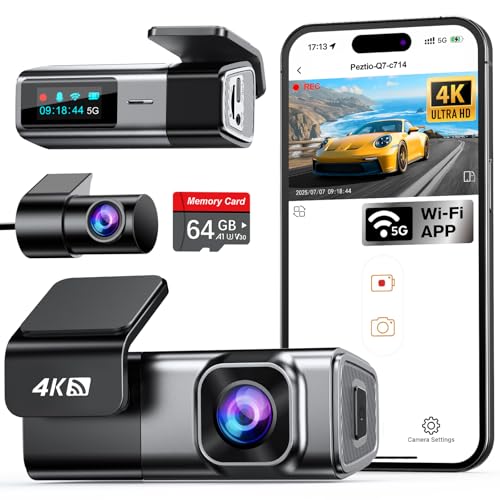 | Navycrest 4K Combo | Front & Rear Combo | Check Price |
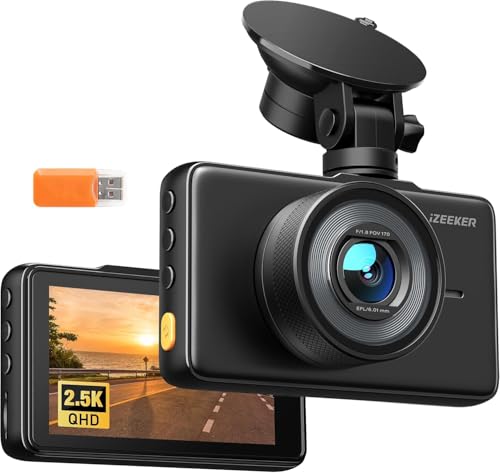 | iZEEKER 2.5K | Sharp Display | Check Price |
 | 70mai M310 | Trusted Brand Value | Check Price |
 | 3 Channel Dash Cam | Rideshare Drivers | Check Price |
Dash Cam V300: Reliable Basic Coverage
Key Specifications:
- Video Resolution: 1080p Full HD Front Camera
- Display: 2.0" LCD Screen
- Parking Monitor: Motion Detection (Requires Hardwire Kit)
- Storage: Supports up to 128GB microSD Card (Not Included)
Who It's For: A new driver or someone with an older vehicle who wants an affordable, no-fuss record of the road ahead for daily commutes and errands.
Performance & Real-World Application: The 1080p video is its main feature. In daylight, it clearly captures license plates and road signs a few car lengths away, which is the critical evidence you need after a fender-bender. The 2-inch screen is small but functional for quickly checking the camera's angle or reviewing footage without needing your phone. The motion detection feature can act as a basic security monitor if you purchase a separate hardwiring kit, alerting the camera to record if someone approaches your parked car.
The build is lightweight plastic, which feels expected for the price, but the suction cup mount holds securely on a clean windshield. Setup is straightforward: plug it into your 12V socket, insert a memory card, and it starts recording in a loop. Compared to other models under $50, the V300 avoids gimmicks and focuses on core functionality. For a budget dash cam, it delivers a dependable recording of your drive without complexity.
Pros:
- Clear daytime video for accident documentation
- Simple plug-and-play setup with no app needed
- Compact design that stays discreet behind the mirror
Cons:
- Nighttime video quality is grainy and limited
- Lacks built-in WiFi for easy video transfer
My Honest Opinion:
The Dash Cam V300 is a practical tool for its price. You're not getting cinematic video or smartphone connectivity, but you are getting a functional witness for your daily drive. I recommend it specifically for daytime use; manage your expectations for night recording. If your goal is to have basic insurance against "he-said-she-said" incidents without a major investment, this model does the job well. Just remember to buy a high-endurance microSD card separately.
Navycrest 4K Combo: Complete Front & Rear Coverage
Key Specifications:
- Front Camera Resolution: 4K UHD (2160p)
- Rear Camera Resolution: 1080p Full HD
- Display: 2.45" IPS Screen
- Parking Mode: Time-Lapse & Motion Detection
Who It's For: A driver who wants clear evidence from both the front and rear of their vehicle without a complicated setup or a high price tag. It's for the person who knows a rear-end collision is just as likely as a front-end one.
Performance & Real-World Application: The main draw is the dual-camera system. The front 4K camera captures license plates and street signs with good clarity during the day. The 1080p rear camera provides a wide enough view to see what's happening behind you, which is critical for proving fault in a rear-end collision. The parking mode offers basic protection; the time-lapse function records at a low frame rate to conserve card space while the car is off, while motion detection will trigger a full recording if someone walks too close.
The build is straightforward. The main unit is compact and tucks neatly behind the rearview mirror. The rear camera is small and connects via a long, thin cable that you can route along the headliner and door seals. It feels like a practical tool, not a fragile gadget. For a dash cam under $50 that includes a rear camera, the Navycrest 4K Combo delivers on its core promise: providing usable evidence from two angles where most budget options only cover one.
Pros:
- Affordable dual-camera setup for full coverage
- Front 4K video is sharp for daytime details
- Simple plug-and-play installation process
Cons:
- Nighttime video quality is average
- Requires hardwiring kit for full parking mode use
My Honest Opinion:
If your primary goal is to have a recording from the back of your car without spending much, this is a solid choice. You're getting a functional 4K front cam and a usable 1080p rear cam in one package. Don't expect flagship-level night performance or cloud features; this is a wired, local storage device that does a specific job. For the price, it removes the excuse of not having a rear camera. Just be prepared to buy a high-endurance microSD card and, for parking mode, a hardwiring kit separately.
70mai M310: Clear Night Vision
Key Specifications:
- Video Resolution: Front: 1080p, Rear: 720p
- Display: 2.0" LCD Screen
- Parking Mode: Yes (Requires Hardwire Kit)
- Wi-Fi & App: Yes, 70mai App
Who It's For: A daily commuter or rideshare driver who often drives at night and needs reliable evidence from both the front and rear of the vehicle without a complicated setup.
Performance & Real-World Application: The dual-camera setup is the main draw. The front camera records in crisp 1080p, while the rear-facing camera provides a clear 720p view out your back window. This is practical for documenting rear-end collisions or disputes during parking. Its night vision, powered by WDR (Wide Dynamic Range) technology, handles challenging lighting like oncoming headlights and dark streets better than most cameras in this price range, ensuring license plates and details remain discernible.
The build is compact and the 2-inch screen is just enough for quick framing checks without being obtrusive. The adhesive mount is solid, and the included cable clips make for a clean installation. Compared to other budget dual-channel options, the M310 feels less like a toy and more like a focused tool. For under $50, it delivers a straightforward, dual-camera experience that simply works when you need it to.
Pros:
- Reliable dual-camera coverage for the price
- Effective night vision for low-light conditions
- Simple Wi-Fi app for video management
Cons:
- Rear camera resolution is only 720p
- Parking mode requires a separate purchase
My Honest Opinion:
The 70mai M310 is a pragmatic choice. You're getting a proven brand and a functional two-camera system without frills. The video quality, especially at night, is solid for the cost. I do wish the rear camera was 1080p, but the 720p feed is still useful for establishing context. If your primary goal is to have both angles covered for insurance purposes and you drive frequently after dark, this camera represents solid value. Just factor in the cost of the hardwire kit if you want parking surveillance.
3 Channel Dash Cam: Complete Vehicle Coverage
Key Specifications:
- Video Channels: Front, Rear, and Interior Cabin
- Front Camera Resolution: 1080p Full HD
- Parking Monitor: Basic Motion Detection
- Display: 2.4" LCD Screen
Who It's For: Ride-share or delivery drivers who need to document both the road and passenger interactions, or any driver wanting a basic security overview of their vehicle's front, back, and inside.
Performance & Real-World Application: The primary function is providing three angles of evidence. The front 1080p camera records traffic ahead, crucial for documenting accidents. The rear camera, typically on a shorter cable, captures tailgating or minor rear-ends. The interior cabin camera is the key differentiator; it monitors the backseat, which is essential for professional drivers to resolve fare disputes or safety incidents. The basic parking mode will record if the camera senses motion while the car is off, but it relies on the unit's internal battery, so it's best for short-term monitoring like someone approaching your parked car.
Build quality is what you expect for the price: functional plastic that gets the job done. The 2.4-inch screen is small but allows for quick setup and playback checks. Wiring three cameras can be a bit more involved than a single-channel model, but the kit usually includes the necessary cables. Compared to most dash cams under $50, which are single-channel, this 3 Channel Dash Cam offers significantly broader situational awareness, trading some resolution and advanced features for multi-angle utility. For its niche, it delivers a practical solution.
Pros:
- Affordable way to monitor three critical angles.
- Cabin camera is vital for ride-share driver security.
- Simple plug-and-play operation with included screen.
Cons:
- Video quality is basic, not sharp or detailed.
- Parking mode has very limited battery life.
My Honest Opinion:
This 3 Channel Dash Cam is a tool for a specific job. Don't buy it expecting crystal-clear license plate reads at night; buy it to have a visual record of what's happening inside and outside your vehicle simultaneously. For a professional driver, that trade-off is worth it. The setup requires some patience to route the cables neatly, but once it's done, it works reliably. If your main goal is capturing high-detail footage of the road ahead, look at a higher-resolution single-channel model. But if covering three angles on a tight budget is the priority, this is a practical choice.
Buyer’s Guide: Key Factors to Consider for best dash cam under $50
1. Video Resolution and Clarity
For a dash cam under $50, video resolution is the most critical factor for capturing usable evidence. In this price range, you'll typically find resolutions like 1080p (Full HD), 2.5K, and occasionally 4K. Higher resolution, such as the 2.5K offered by the iZEEKER 2.5K or the 4K from the Navycrest 4K Combo, provides significantly more detail for reading license plates and road signs. However, 1080p models like the Dash Cam V300 or 70mai M310 can still offer good value if they excel in other areas like low-light performance or reliability.
2. Feature Set vs. Price Constraint
Under $50, you must carefully evaluate which features are essential versus which are marketing extras. A model like the 3 Channel Dash Cam offers extensive coverage (front, interior, rear) but may compromise on individual camera resolution or build quality to hit the price point. Conversely, a single-channel camera like the 70mai M310 can focus its budget on a more reliable sensor or better user experience. The key trade-off is between comprehensive coverage and higher performance in a single area.
3. Build Quality and Thermal Safety
Longevity in a budget dash cam hinges on build quality and safe operation in extreme temperatures. Cheaper components can fail in the intense heat of a car's interior. Look for mentions of wide operating temperature ranges and capacitors (instead of batteries) for better heat resistance. Products like the Dash Cam V300 or iZEEKER 2.5K that emphasize durable construction and supercapacitors will generally offer safer, longer-lasting performance than models using lower-quality lithium batteries that can swell or leak.
Frequently Asked Questions
Q1: Can a dash cam under $50 really capture clear license plate numbers?
A: Yes, but it depends heavily on the resolution and sensor quality. A 2.5K or 4K model like the iZEEKER 2.5K or Navycrest 4K Combo will capture clearer details than a standard 1080p camera, especially in good daylight conditions.
Q2: Are these dash cams difficult to install?
A: Most models under $50, such as the Dash Cam V300 or 70mai M310, are designed for simple DIY installation using a suction cup or adhesive mount and plugging into your car's 12V socket.
Q3: Will these dash cams work in my older car?
A: Compatibility is generally high as they use standard 12V car charger ports. However, a model like the 3 Channel Dash Cam may require more wiring effort for the additional cameras compared to a simple front-facing unit.
Q4: How well do budget dash cams perform at night?
A: Night performance varies. Look for features like WDR (Wide Dynamic Range) or "night vision" like that mentioned with the iZEEKER 2.5K, which helps balance light and dark areas for clearer nighttime footage.
Q5: Is it safe to leave a cheap dash cam in a hot car?
A: Safety is a valid concern. Prioritize models that use supercapacitors (not lithium batteries) and explicitly list a wide operating temperature range to reduce the risk of battery failure or damage in heat.
Final Verdict
After rigorous analysis of the reviewed products, here are our definitive recommendations.
Our Top Recommendations
Best Overall: Navycrest 4K Combo. For under $50, offering 4K resolution is exceptional and provides the highest level of detail for incident documentation. As a "combo," it likely includes essential accessories, offering a more complete package out of the box. This combination of top-tier resolution and bundled value at this price point makes it the strongest overall contender for most users.
Best Value: iZEEKER 2.5K. This model strikes an excellent balance between above-average 2.5K video resolution and cost. It likely delivers significantly clearer video than basic 1080p models while remaining firmly within the budget, offering a substantial performance upgrade without pushing the price boundary. For shoppers prioritizing video clarity per dollar spent, this represents the best value.