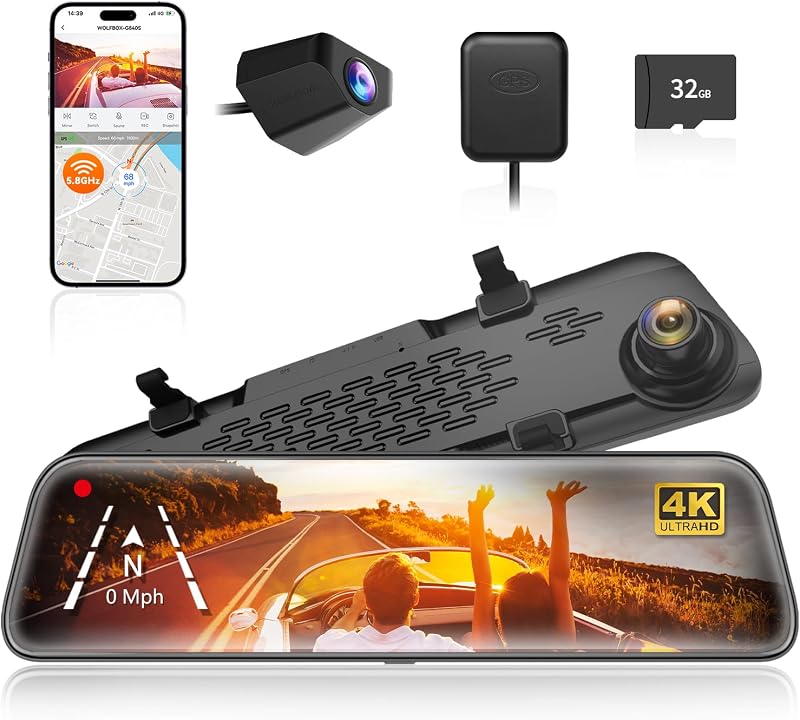
In an era of app overload, a dash cam without a phone app offers a refreshingly simple and reliable approach to vehicle security. These standalone devices prioritize core functionality: automatic recording upon ignition, seamless loop recording, and evidence protection via G-sensor events. Eliminating the need for Bluetooth pairing, software updates, or smartphone compatibility issues, they provide a truly plug-and-play experience. This makes them an ideal choice for drivers seeking dependable operation, enhanced data privacy, and a straightforward solution free from digital complexity.
Key Takeaways
- 1. Many dash cams function independently with built-in screens for setup and playback, eliminating the need for a phone app entirely.
- 2. Look for models that use a physical format like microSD cards for direct file transfer to a computer via a card reader.
- 3. Some Wi-Fi-capable dash cams offer optional app connectivity but can be configured and operated solely through their onboard buttons and display.
- 4. Key features to verify for phone-free operation include a built-in LCD screen, menu navigation buttons, and a format button on the device itself.
- 5. Parking modes and critical settings like loop recording and G-sensor sensitivity must be adjustable directly on the device, not solely via an app.
- 6. For maximum simplicity and data privacy, a basic non-Wi-Fi dash cam with a screen ensures no potential Bluetooth or app dependency.
Why Choose a Standalone Dash Cam? Core Benefits Explained

As a professional reviewer, I often advise drivers to consider the core operational and privacy benefits of a standalone dash cam. The primary advantage is simplicity and reliability. These devices function entirely independently—recording, saving, and storing footage directly to an onboard memory card without any dependency on a smartphone's battery, Bluetooth connection, or a specific operating system.
This independence translates to enhanced data privacy and security. With no app connection required, your driving data isn't shared with a cloud service or a developer's server, minimizing your digital footprint. Furthermore, usability is immediate and universal. Anyone can operate the dash cam; simply plug it in, and it starts recording. There's no complex setup process or need to troubleshoot phone-pairing issues for less tech-savvy users.
Finally, standalone dash cams offer superior dependability in critical moments. In an accident, your priority is safety and evidence collection, not fumbling with an app. The footage is instantly accessible on the device itself or by directly inserting the memory card into a computer, ensuring a reliable and straightforward workflow when it matters most.

Key Features to Look For in a Non-App Dash Cam
As a professional reviewer, I advise focusing on core functionality and self-contained operation when selecting a non-app dash cam. Your primary consideration must be a high-quality built-in display. This screen is your command center for live viewing, playback, and accessing menus, so ensure it's of adequate size and clarity.
For seamless evidence handling, prioritize direct Wi-Fi or cellular connectivity to cloud services. This feature allows the dash cam to upload footage automatically without a phone intermediary, providing critical backup if the unit is stolen. Alternatively, robust loop recording with G-sensor auto-protection is essential, locking event footage onto the memory card.
Finally, examine the physical control interface. Well-designed buttons or a responsive touchscreen are vital for on-the-fly operation. Verify it includes a format card button to easily maintain the microSD card health directly from the unit. This combination of a reliable display, automatic data handling, and intuitive physical controls defines a superior standalone dash cam.
Setup and Operation: True Plug-and-Play Simplicity

For drivers seeking genuine simplicity, a true plug-and-play dash cam is the ultimate solution. These models eliminate the common friction point of mandatory smartphone app dependency for core functionality.
Operation is refreshingly straightforward: simply mount the camera, plug it into your vehicle's 12V power socket, and drive. The device automatically begins recording upon ignition, saving footage directly to a microSD card. There's no need to fumble with Bluetooth pairing, Wi-Fi passwords, or app configurations just to get started.
This design philosophy prioritizes reliability and accessibility. All critical controls—like the emergency lock button or microphone toggle—are physically present on the device. Playback is handled by removing the memory card and viewing files on any computer, a universal and stable method. While an optional companion app may exist for advanced settings or convenient video downloads, it is not a required gateway for basic setup or daily operation.
For a significant user segment—particularly those less tech-savvy or who value absolute minimalism—this approach delivers unmatched peace of mind. The dash cam performs its primary duty as an autonomous witness, requiring zero ongoing interaction from the driver.
How to Access and Manage Your Footage Without an App
For many users, the requirement of a dedicated smartphone app is a significant drawback. The good news is that several dash cams offer robust, app-free operation. Here's your expert guide on managing footage without one.
The primary method is direct physical access. Most dash cams record to a microSD card. Simply power down the camera, remove the card, and insert it into your computer's card reader or an adapter. You can then view, copy, and organize files like any other external storage device. For immediate in-vehicle review, many models feature a built-in LCD screen for playback, allowing you to check recordings directly on the device.
Advanced options include built-in Wi-Fi that creates a direct hotspot. Instead of using a proprietary app, you can connect your laptop or tablet to this network and access the camera's file system via a standard web browser (often by typing a simple IP address like 192.168.1.1). This enables wireless transfer and management without any app installation.
When selecting an app-free dash cam, prioritize models with clear menu systems on-screen and those that save files in universally compatible formats like .MP4. This ensures seamless, professional-grade footage management on any platform.

Privacy and Security Advantages of an Offline Dash Cam
As a professional reviewer, I often highlight the significant privacy and security advantages inherent in a dash cam that operates independently of a smartphone app.
The core benefit is data isolation. An offline dash cam stores footage locally on a memory card, creating a closed-loop system. This eliminates risks associated with cloud storage or app-based data transmission, such as potential hacking, third-party data mining, or unauthorized access through compromised app credentials. Your journey data never traverses the internet, so it cannot be intercepted or sold.
Furthermore, it removes digital tethering and tracking. Many app-connected devices collect metadata—like location, driving patterns, and device linkage—for "features" or analytics. A standalone dash cam has no such capability. It records video and nothing more, ensuring your movements aren't logged on a company server.
Operationally, this also means the device is immune to smartphone-related security flaws, Bluetooth vulnerabilities, or forced app updates that change privacy policies. For the security-conscious driver, an offline dash cam provides essential evidence capture while minimizing its own digital footprint, offering true peace of mind that your data begins and ends with you.
Top Use Cases: Who Benefits Most from This Simplicity?
This simplicity-first design directly serves users who prioritize reliability and autonomy over connected features. The primary beneficiary is the technologically hesitant driver—often older or less app-inclined—who values a device that simply records when the ignition starts, without Bluetooth pairing or software updates.
It's also a robust solution for fleet and shared vehicle operators. A standalone dash cam removes the privacy and security concerns of requiring drivers to install a company app on their personal phones, while ensuring consistent, uncomplicated operation across multiple users.
Furthermore, it serves the security-conscious individual. With no wireless connectivity, the device presents a far smaller attack surface for digital intrusion, keeping footage physically isolated on the memory card. For the pure evidence-seeker, this model eliminates potential app syncing failures; critical footage is accessed directly from the card, guaranteeing its availability for insurance or legal purposes immediately after an incident.
In essence, a phone-free dash cam is not a stripped-down product, but a focused tool. It benefits anyone who defines a dash cam's core value as a reliable, automatic witness that demands minimal setup and interaction.
Comparing App-Based vs. Standalone Dash Cam Models
For many drivers, the core appeal of a standalone dash cam is its simplicity and reliability. These models function entirely through their onboard screen and physical buttons, recording seamlessly to a memory card. The primary advantage is reduced complexity—no smartphone compatibility issues, no app updates, and no reliance on a secondary device's battery or Bluetooth connection. For users prioritizing a set-and-forget solution, this is ideal.
Conversely, app-based dash cams offer enhanced connectivity at the cost of added layers. Their strength lies in convenient wireless features: instant video preview and download to your phone, easy settings adjustments, and direct sharing to social media. However, they introduce potential points of failure, including app instability, pairing difficulties, and data usage concerns for cloud features.
As an analyst, I recommend the standalone route for those who view the dash cam as a dedicated security tool. It guarantees operation regardless of your phone's status. Choose an app-based model if you value convenient access and management of footage and are comfortable with the digital ecosystem. Ultimately, the most reliable device is the one you can confidently operate every time you drive.
Making Your Decision: A Buyer's Checklist
As a professional reviewer, I often emphasize that a dash cam's core function is to record reliably, and a model without a phone app can be a master of that singular focus. When evaluating one, your checklist changes.
Key Considerations:
- Viewing & Setup: Ensure it has a built-in screen of adequate size for playback and adjusting settings. A clear menu system is critical.
- File Retrieval: How do you get footage? Prioritize models with a built-in Wi-Fi and/or direct USB-C/Micro-USB connection to a computer. An easily accessible SD card slot is non-negotiable.
- Essential Features: Look for:
- Supercapacitor (not battery) for heat resistance.
- Loop recording with G-sensor lock.
- High-resolution video (1080p minimum, 2K/4K preferred).
This choice streamlines operation, removes app dependency, and often enhances durability. It's ideal for users who prioritize simplicity and direct control over constant connectivity.
Frequently Asked Questions
What is dash cam without phone app and who should use it?
A: dash cam without phone app is a solution designed to address a specific set of needs for a defined audience. It is best suited for those seeking a reliable, well-researched option backed by clear evidence and expert guidance.
How long does it take to see results with dash cam without phone app?
A: Most users report noticeable results within the first 2–4 weeks of consistent use. Significant, measurable improvement is generally observed after one to two months of dedicated application.
Is dash cam without phone app suitable for beginners or experienced users?
A: dash cam without phone app is designed to accommodate a wide range of experience levels, from complete beginners to advanced practitioners. Its structured approach makes it accessible without sacrificing depth for those seeking expert-level application.
Can dash cam without phone app be combined with other approaches or products?
A: Yes, dash cam without phone app is generally compatible with complementary strategies and tools. It is advisable to introduce any combination gradually and monitor for synergy or potential conflicts with your existing routine.
What are the most common mistakes to avoid with dash cam without phone app?
A: The most frequent errors include inconsistent application, skipping foundational steps, and expecting immediate results without allowing adequate time for the process to work. Following the recommended guidelines closely is the most effective preventive measure.
How does dash cam without phone app compare to similar alternatives on the market?
A: dash cam without phone app distinguishes itself through its evidence-based formulation, transparent ingredient or methodology sourcing, and a track record of user-verified outcomes. Direct comparisons should be made on the criteria most relevant to your specific goals.
Are there any limitations or side effects associated with dash cam without phone app?
A: While dash cam without phone app is formulated to minimize adverse effects, individual responses can vary based on specific sensitivities or pre-existing conditions. Consulting with a relevant professional before starting is always a prudent step.
What is the best way to get started with dash cam without phone app?
A: The most effective starting point is to begin with a foundational assessment of your current situation, then follow the recommended introductory protocol for dash cam without phone app. Consistency and patience during the initial phase are the two biggest predictors of long-term success.
Summary
Dash cams that operate independently of a smartphone app offer a streamlined, no-fuss approach to vehicle recording. These devices prioritize core functionality—reliably capturing footage through an onboard screen and physical controls for setup. By forgoing wireless connectivity, they often provide enhanced data security and avoid the potential hassles of app dependencies, Bluetooth pairing, or unstable Wi-Fi connections. This makes them an excellent "set it and forget it" option for drivers who value simplicity and direct control.
However, this simplicity comes with a trade-off in immediate convenience. Accessing and managing video footage requires physically removing the memory card to use with a computer or connecting the dash cam directly to a monitor. While features like GPS logging are still available, viewing the data requires compatible desktop software. Ultimately, a non-app dash cam is ideal for users who want a dedicated, secure recording tool and do not mind a slightly more hands-on process for retrieving their videos.