Determining whether or not do car cameras record sound is a fundamental step for any driver looking to optimize their vehicle security system.
This guide is designed for car owners and fleet managers who want to understand the capabilities and limitations of dash cam audio recording. We assume a basic familiarity with vehicle electronics, though no advanced technical experience is required to follow these instructions.
By the end of this guide, you will be able to verify your camera’s audio settings, understand the legal implications of cabin recording, and properly configure your device for your specific security needs.
- How dash cam microphones function.
- Legal considerations regarding audio recording.
- Hardware configuration and menu settings.
- Troubleshooting common audio silence issues.
- Privacy implications for passengers and drivers.
Overview & Prerequisites
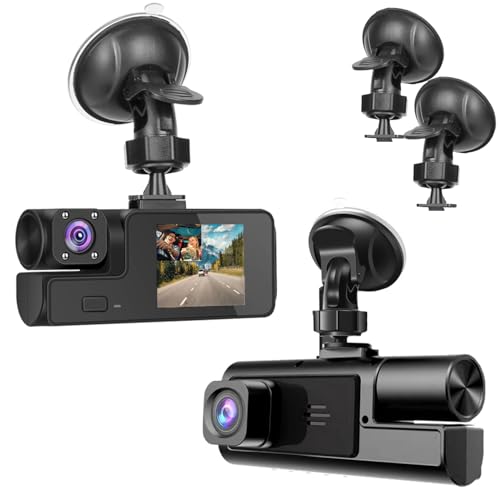
Required Tools and Knowledge
To determine if your unit records sound, you will need your dash cam's user manual, the device itself, and a computer with an SD card reader. Understanding how are dash cams powered? The complete guide to installation methods will help you identify if your model supports secondary features like internal microphones.
Assessing Your Specific Hardware
Not every dash cam is built with an integrated microphone. Check the casing of your unit for a small pinhole—this is often the external port for the onboard microphone. If you are unsure, consult your specific manufacturer documentation before proceeding.
Core Concepts & Fundamentals

Understanding Microphone Functionality
Dash cams capture audio through a small piezoelectric or condenser microphone located on the housing. When enabled, this input is synced with the video file in the processor. Unlike video, which requires high bandwidth, audio creates very small file overhead, making it easy to store alongside high-definition footage.
Mental Models: Audio Recording Expectations
| Correct Mental Model | Incorrect Mental Model |
|---|---|
| Audio records ambient cabin sounds. | Audio captures distant external conversations. |
| Privacy laws vary by jurisdiction. | All dash cam audio is legal as evidence. |
| Microphone can be toggled via software. | Microphones are always "always-on" hardware. |
If you are planning to leave your camera on while away, be aware of do dash cams record when the car is off? Everything You Need to Know for 24/7 Security, which outlines how audio interacts with parking mode settings.
Step-by-Step Execution Guide

Preparation and Settings Review
Begin by powering on your device. Most modern cameras allow you to toggle the audio capture directly through the LCD menu or a dedicated mobile application.
Execution and Verification
Recommended Equipment & Solution
360 View 4 Channel Dash Cam Front
A reliable pick for 360 View 4 Channel Dash, selected based on this article's guidance.

Hidden Camera Spy Camera,1080p Hidden Cameras Car
A reliable pick for Hidden Camera Spy Camera,1080p Hidden, selected based on this article's guidance.
Best Practices & Pro Tips

Optimizing for Clarity
Keep your device away from A/C vents, as constant airflow can create significant white noise in your recordings. Ensuring the device is securely mounted will also prevent vibrations from being picked up by the microphone.
Privacy and Management
Troubleshooting & Common Pitfalls

Solving Silence and Audio Failures
If you cannot hear any sound on your playback, ensure that you are using a media player that supports the audio codec used by your camera, such as VLC, which is often more compatible than default system players.
Common Hardware Failures
For more complex installation issues, refer to how much installing a dash camera costs: A Complete Pricing Guide to determine if a professional recalibration is needed.
Frequently Asked Questions
Do all car cameras record sound?
A: No, not all dash cams include microphones. Some units exclude them for privacy or design simplicity.
Can I turn off the sound recording?
A: Yes, nearly all dash cams that record audio allow you to disable the feature in the menu settings.
Is it illegal to record audio in a car?
A: It depends on local "two-party consent" laws. Always verify if you need passenger permission in your jurisdiction.
Does sound recording use more storage?
A: Audio files are minimal in size compared to video, so it will not significantly impact your overall storage capacity.
Why is the audio quality low?
A: Most dash cam mics are small and capture ambient sound. They are not intended for high-fidelity recording of distant voices.
Does wind affect the recording?
A: Yes, if your windows are open, wind noise will dominate the audio track. Keep windows closed for the best results.
Can I add an external mic?
A: Most standard consumer dash cams do not support external microphone inputs. Check your specific manual for external jack compatibility.
Will audio help me in an insurance claim?
A: Occasionally, yes. It can provide context about interactions or alert the driver to external hazards like sirens.
Key Takeaways
- 1 Most dash cams support audio, but it is not universal.
- 2 You can usually enable or disable audio in the device settings.
- 3 Privacy laws vary, so check your local regulations.
- 4 Keep the microphone port free of dust and debris for quality.
- 5 Always perform a test recording to ensure hardware functionality.
- 6 High-quality SD cards are essential for stable A/V syncing.
- 7 Use VLC or similar players to avoid codec compatibility issues.
Conclusion
Understanding whether your car camera records sound is key to managing your privacy and your evidence collection. By following the steps outlined in this guide, you can ensure your device is configured to your exact requirements while remaining compliant with local standards.
If you encounter issues, remember that a simple firmware update or a check of the physical microphone port often resolves the most common audio playback problems.
Take charge of your security settings today to ensure your dash cam works exactly how you need it to during your next commute. For further guidance on mounting, see our Baby Car Camera Mounting Tips: Secure Setup Guide 2026.