
Choosing the right micro sd card for dash cam 64 gb storage is the most critical decision you can make to ensure your footage is there when you actually need it.
This guide is designed for car owners and tech enthusiasts who want to move beyond generic memory storage and understand the specific demands of high-endurance, repetitive-write dash cam environments. It assumes a basic level of comfort with handling small electronics but provides enough technical detail to ensure you avoid common failures.
By the end of this guide, you will be able to identify high-endurance hardware, properly format your storage, and troubleshoot recording errors with professional precision.
- Why endurance ratings matter more than capacity.
- The importance of periodic formatting to prevent corruption.
- Recognizing the physical and logical signs of card failure.
- How to properly balance resolution settings with storage space.
- Steps to verify your dash cam compatibility requirements.
Overview & Prerequisites
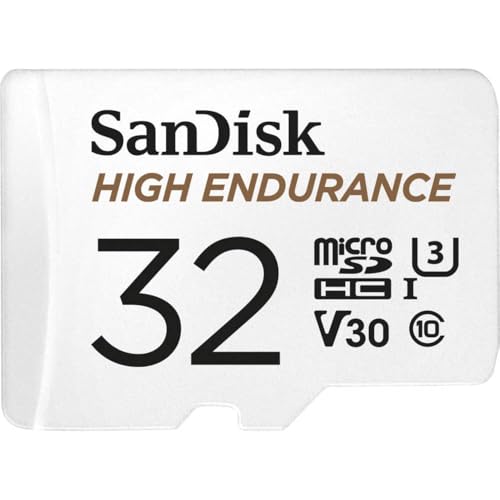
Required Hardware and Specifications
Before purchasing, confirm your dash cam supports 64GB capacities, as some older models have strict limits. You need a "High Endurance" or "Max Endurance" card specifically engineered for 24/7 video surveillance. A standard card intended for cameras or phones will likely experience rapid cell degradation in a high-heat, constant-write environment.
Understanding Compatibility
Your dash cam manual will specify a minimum "Class" (usually Class 10 or UHS-1). Always verify the speed requirements for your camera's resolution. If you are learning how to maintain your setup, consider reading up on Battery life on dash cam: Everything you need to know for reliable recording to ensure your power source complements your storage.
Core Concepts & Fundamentals

Why High-Endurance Matters
Unlike a phone, which writes data sporadically, a dash cam writes data in a continuous loop. Over time, this constant overwriting wears out the storage cells. High-endurance cards use specialized NAND flash memory designed to withstand these thousands of cycles. Understanding these mechanics is vital, especially if you also use a Non GPS dashcam guide: Why privacy-focused drivers choose them for your vehicle.
The Formatting Principle
Formatting is not just for clearing space; it maintains the card's file allocation table (FAT32 or exFAT). When you format the card within the dash cam itself, you ensure the device creates the proprietary folder structure it needs to write files correctly.
| Feature | Standard Card | High-Endurance Card |
|---|---|---|
| Write Cycles | Low | High |
| Heat Tolerance | Moderate | Extreme |
| Ideal Use | Photography | Dash Cam / Surveillance |
Step-by-Step Execution Guide

Preparation and Selection
Choose a name-brand micro sd card for dash cam 64 gb usage that features a "High Endurance" label. Ensure the card class is U3 or V30 if you are recording in 4K resolution to prevent frame drops.
Installation and Formatting
If you are upgrading your entire system, consider checking How to hardwire a dash cam: The Ultimate Step-by-Step DIY Guide to complete your installation.
Recommended Equipment & Solution

SANDISK 64GB High Endurance Video microSDXC Card
A reliable pick for SANDISK 64GB High Endurance Video, selected based on this article's guidance.

TIDEFORCIX 64GB Micro SD Card for Dashcam
A reliable pick for TIDEFORCIX 64GB Micro SD Card, selected based on this article's guidance.
Best Practices & Pro Tips

Maintenance Schedules
Perform a manual format every 30 to 60 days. This keeps the file system clean and reduces the likelihood of fragmented clusters that could lead to corrupted video files.
Temperature and Usage
Excessive heat is the enemy of storage. Whenever possible, park in the shade. Consistent high temperatures inside a vehicle cabin can accelerate the aging process of even the most robust high-endurance cards.
Troubleshooting & Common Pitfalls

Identifying Card Errors
If your dash cam beeps constantly or displays a "Card Error" message, the memory card is likely the culprit. Verify the seating of the card first, as vibrations can occasionally cause a card to unseat slightly.
Addressing Corruption
If the device stops recording abruptly, you may be experiencing file corruption. Consult the Do dash cams record audio? Everything you need to know about sound capture if your camera has specific audio-sync error indicators that correlate with storage issues.
Frequently Asked Questions
Can I use a 128GB card if my camera supports 64GB?
A: Not always. Check the manual's "Max Capacity" rating. Using a card larger than the supported limit may lead to instability or boot failure.
Do I really need a "High Endurance" card?
A: Yes. Standard cards lack the thermal and write-cycle endurance required for the intense, constant writing environment of dash cams.
How often should I format the card?
A: It is best practice to format your card once every month to clear out fragmented files and ensure smooth loop-recording performance.
Why is my recording suddenly missing?
A: This is often caused by a corrupt file blocking the loop. Formatting the card and checking your G-sensor sensitivity settings can often solve this.
Is there a difference between SD and Micro SD?
A: Yes, the physical form factor differs. Dash cams almost exclusively use "Micro" SD cards, which include a full-size adapter in the box.
Does a 64GB card affect video quality?
A: No, the card does not change the image quality; it only determines how much footage you can store before the device begins to overwrite the oldest files.
Can I recover deleted footage?
A: Recovery is difficult because the dash cam operates on a loop. Once a file is overwritten, it is permanently replaced by new data.
Why does my card get hot?
A: Memory cards generate heat when reading and writing data. Using a high-endurance card helps manage this heat better than consumer-grade alternatives.
Key Takeaways
- 1 Always use "High Endurance" branded micro sd cards for dash cam 64 gb systems.
- 2 Never format your dash cam card on a computer; always format it within the dash cam menu.
- 3 Check your camera's official manual for the maximum supported GB capacity before purchasing.
- 4 Format the card every 30-60 days to prevent file system fragmentation.
- 5 If you hear persistent "Card Error" beeps, replace the card immediately to avoid losing critical footage.
- 6 High temperatures from direct sunlight can reduce the lifespan of your memory card.
- 7 A 64GB card is the ideal balance for most daily commuters to capture a full day's worth of driving.
Conclusion
Choosing the right micro sd card for dash cam 64 gb setups is an investment in your peace of mind. By prioritizing endurance and maintaining your file system through regular formatting, you ensure your dash cam remains a reliable witness on the road.
Remember that hardware is not infallible. Even the best cards reach their end-of-life eventually, so check your camera's status lights periodically.
Take care of your memory card, and it will take care of your footage when it matters most.







