Determining what is front view camera and back view camera difference is the first step toward building a reliable vehicle security system in 2026.
This guide is designed for car owners and DIY enthusiasts who want to understand the architectural requirements of multi-channel dash cam setups, regardless of your current technical background.
By the end of this article, you will be able to distinguish between forward-facing and rear-facing lenses, determine the optimal hardware for your vehicle, and configure your system for maximum coverage.
- Primary sensor orientation differences.
- Field of view (FOV) variances between units.
- Wiring requirements for dual-channel systems.
- Integration with parking surveillance features.
- Data management for dual-stream recording.
Overview & Prerequisites

Hardware Requirements
To implement a dual-camera system, you need a central dash cam unit capable of multi-channel input. Verify that your hardware supports a high-bitrate connection to the rear lens, which is often done via a proprietary video cable.
Assessing Your Vehicle Layout
Understanding Do dash cams record when the car is off? is essential, as the power demands change when running both cameras simultaneously, particularly in parking mode.
Always inspect the rear window tint before mounting. Dark tints can drastically reduce low-light performance for back-facing cameras.
Core Concepts & Fundamentals

Sensor Focal Length and Purpose
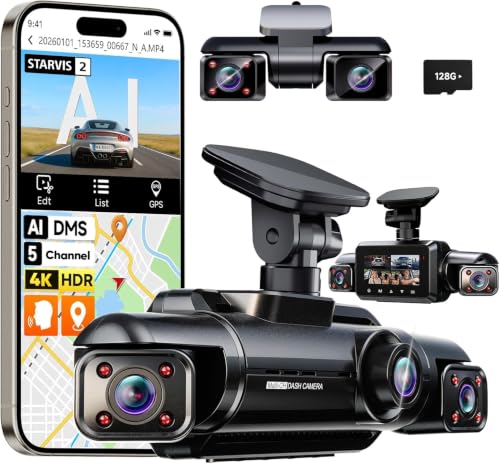
The front-facing camera serves as your primary evidence collector, focusing on wide-angle capture of the road ahead, traffic signals, and license plates. The back view camera, often smaller and discreet, is optimized for monitoring tailgating incidents or rear-impact collisions.
Connectivity and Data Flow
Front units usually contain the processor and memory card slot, while back units transmit raw video data to the front unit. This dependency means the front camera must have sufficient processing power to encode two streams concurrently.
| Feature | Front Camera | Back Camera |
|---|---|---|
| Primary Goal | Forward traffic/Accident footage | Rear impact/Tailgating |
| Resolution | 4K or 2K HDR (High Priority) | 1080p (Standard) |
| Placement | Center-top of windshield | Top of rear window or license plate |
For those interested in interior monitoring, learning How Does Baby Car Camera Work? provides a parallel perspective on internal-facing camera technology.
Step-by-Step Execution Guide

Preparation and Planning
Before installing, map out the wire routing path. Avoid airbag pathways to ensure your safety system remains functional. Test the connection between the front and back units before finalizing adhesive mounting.
Installation and Calibration
Recommended Equipment & Solution

10’’ Mirror Dash Cam Front and Rear
A reliable pick for 10’’ Mirror Dash Cam Front, selected based on this article's guidance.

360° Dash Cam Front and Rear View
A reliable pick for 360° Dash Cam Front, selected based on this article's guidance.
Best Practices & Pro Tips

Optimizing Video Quality
Keep your lenses clean to maintain clarity. In the case of the back camera, ensure it is positioned to avoid glare from the rear defrost lines, which can sometimes distort night footage.
Power Management
If you require long-term recording, check out 5 Best Spare Dash Cam Battery Options for Long-Lasting Parking Mode to prevent your vehicle battery from draining prematurely.
Troubleshooting & Common Pitfalls
Connectivity Issues
If the rear camera signal is intermittent, check the connection point at the front unit. Over-tightening cable bends or pinching the wire near the trunk hinge is a frequent cause of signal loss.
Image Clarity Failures
Frequently Asked Questions
Can I use a rear camera as a front camera?
A: No, they use different lenses and wiring protocols.
Does the back camera record in lower quality?
A: Often yes, as manufacturers prioritize processing power for the front-facing sensor.
Are front and back cameras interchangeable?
A: They are rarely interchangeable due to proprietary hardware connections and different firmware tuning.
Do I need two separate dash cams?
A: You can use two, but a dual-channel unit is much more efficient for data storage and management.
Will the rear camera work through heavy window tint?
A: It will function, but low-light performance will be significantly degraded.
Is the back camera waterproof?
A: Only if it is explicitly rated for external, license-plate-mounted use.
How do I sync the audio between cameras?
A: Modern dual-channel systems store both files with synchronized metadata automatically.
Does the front camera drain my battery faster?
A: Both cameras together draw more power than a single unit, especially in parking mode.
Key Takeaways
- 1 Front cameras focus on high-detail road evidence.
- 2 Back cameras provide situational awareness for rear-impact scenarios.
- 3 Dual-channel systems require careful cable routing away from airbags.
- 4 Regular lens cleaning is required for both sensor types.
- 5 MicroSD endurance is critical for dual-channel recording volume.
- 6 Check your rear window tint to ensure adequate visibility.
- 7 Always test hardware connectivity before permanent installation.
Conclusion
Understanding what is front view camera and back view camera difference allows you to make informed decisions about your vehicle's safety technology. By separating their functions and recognizing their hardware requirements, you ensure that every angle of your vehicle is protected during daily commutes.
Whether you are setting up a basic dash cam or an advanced multi-channel system, focus on secure mounting and proper data management. For more advanced setups, consult Baby Car Camera Mounting Tips: Secure Setup Guide 2026 to refine your installation techniques.
Consistent monitoring starts with a well-configured setup—keep your focus forward and your back covered.