
When asking, "can you use a camera as a dash cam," many drivers are looking for a cost-effective way to secure their vehicles without buying dedicated hardware. This illustrative case study follows a typical scenario where a driver attempts to repurpose a high-quality action camera to serve as a daily driving monitor.
This situation is common among enthusiasts who already own portable recording equipment and wonder if the performance gap between consumer cameras and purpose-built dash cams is manageable. By evaluating the integration process, we clarify the trade-offs in power management, loop recording, and heat resistance.
In this guide, we break down the practical steps taken during this transition, the unexpected challenges faced, and the ultimate outcome regarding long-term reliability and evidence collection.
- Understanding the core limitations of non-dedicated hardware.
- The importance of power source management for continuous monitoring.
- Evaluating the transition from manual start/stop to automated loop recording.
- The reality of thermal performance in enclosed vehicle environments.
- Refining the setup based on practical field testing.
The Starting Point: A Common can you use a camera as a dash cam Scenario

The Core Challenge
The primary motivation for many is the assumption that high video resolution equates to dash cam readiness. In our representative scenario, a user attempts to mount an action camera on their windshield, assuming the hardware will capture road incidents just as effectively as a professional unit.
Why the Default Approach Often Falls Short
The initial setup often fails to account for the rigors of automotive use. Without proper power integration, as discussed in How are dash cams powered? The complete guide to installation methods, the camera relies on its internal battery, which is prone to overheating in direct sunlight and often lacks the critical "loop recording" feature necessary to overwrite old footage automatically.
Always verify if your device supports "Auto-Record on Power," a standard feature in dedicated dash cams that is frequently absent in general-purpose cameras.
The Approach & Method

Step-by-Step Integration
To optimize the setup, the driver implemented a systematic, three-phase integration plan focusing on power stability and automated software triggers.
Evaluating Hardware Compatibility
The approach highlighted that while some cameras work as temporary solutions, they rarely offer the seamless experience described in How much installing a dash camera costs: A Complete Pricing Guide.
Recommended Equipment & Solution

ROVE R2-4K Dual Dash Cam Front
A reliable pick for ROVE R2-4K Dual Dash Cam, selected based on this article's guidance.
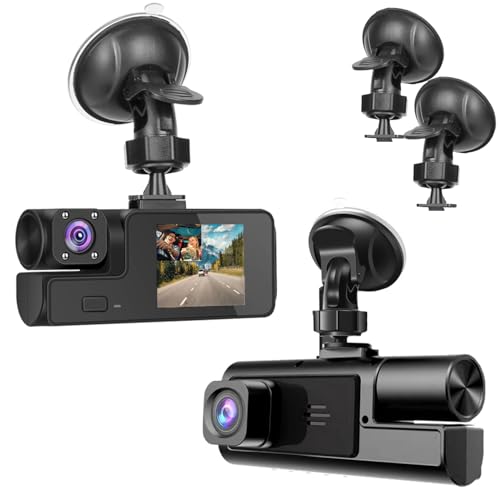
1080P Dual Dash Camera for Car Front
A reliable pick for 1080P Dual Dash Camera, selected based on this article's guidance.
Results & Outcome Analysis

Comparing Performance Metrics
The transition revealed clear differences between standard action cameras and dedicated recording systems. While the video quality was high, the maintenance burden remained significantly higher for the repurposed device.
| Feature | Repurposed Camera | Dedicated Dash Cam |
|---|---|---|
| Startup Speed | Manual/Slow | Automatic/Instant |
| Loop Recording | Limited/Manual | Seamless/Automated |
| Thermal Handling | Moderate Risk | High Resistance |
| Maintenance | Frequent/Active | Set and Forget |
Outcome Summary
The outcome demonstrated that while you can use a camera as a dash cam in a pinch, the "results" are hindered by the manual nature of the system. For reliable incident documentation, the automation provided by dedicated units—similar to those analyzed in Do dash cams record when the car is off?—is consistently preferred.
Success is defined here by the functional ability to capture footage; however, the lack of "set-and-forget" reliability remains a significant barrier to long-term adoption.
Lessons Learned

Key Takeaways for Future Upgrades
The most important lesson learned is that hardware design is as critical as image resolution. While it is technically possible to record, the daily friction of managing a non-specialized camera usually leads users to upgrade to dedicated hardware eventually.
Does This Apply to Your Situation?

When This Scenario Matches Yours
If you have an old action camera sitting in a drawer and need an immediate, short-term solution for a road trip, this approach is a viable stopgap. It helps confirm your recording requirements before investing in a permanent system.
When Your Situation Differs
If you require 24/7 security or consistent documentation for insurance purposes, the limitations of a standard camera will likely fall short of your needs. Individual results will always vary based on the specific camera model, climate, and driving habits; this overview serves only as an illustrative guide.
Frequently Asked Questions
Can you use a camera as a dash cam for insurance purposes?
A: While possible, many insurance companies prefer devices designed specifically for automotive environments due to timestamp and stability features.
Is overheating a major risk for non-dash cam devices?
A: Yes, general-purpose cameras often lack the thermal management required for prolonged exposure to direct sunlight on a dashboard.
How can I improve the reliability of my repurposed camera?
A: Hardwiring the power and using a high-endurance memory card are the best steps to improve consistency.
Do all action cameras support loop recording?
A: No, this is a feature specific to security and dash camera hardware, and its absence is a primary reason to choose a dedicated device.
Can I mount any camera on my dashboard?
A: You must follow local traffic laws regarding visual obstruction, as many dash cam mounts are smaller and lower-profile than action camera housings.
How does temperature affect my memory card?
A: Extreme heat can corrupt data on standard SD cards, which is why automotive-grade "high endurance" cards are recommended.
What is the biggest downside to using a standard camera?
A: The biggest downside is the lack of "automatic loop recording," meaning the camera will stop recording once the memory card is full.
Should I choose a wired or wireless camera?
A: For a dash cam setup, a wired connection is always superior for reliability and ensuring power is linked to the vehicle's ignition.
Key Takeaways
- 1 Repurposing a standard camera is a temporary, not permanent, solution.
- 2 Dedicated dash cams offer automated loop recording which is rarely found elsewhere.
- 3 Thermal management is a significant barrier for non-automotive hardware.
- 4 Hardwiring a camera is the only way to mimic professional ignition-linked power.
- 5 Always check if your device has a "Car Mode" or "Auto-Start" feature.
- 6 High-endurance memory cards are mandatory to prevent data loss.
- 7 Consistent, reliable evidence collection usually requires purpose-built hardware.
Conclusion
While the question "can you use a camera as a dash cam" has a technically positive answer, the practical reality highlights significant gaps in convenience and long-term reliability. For casual use, a repurposed camera may function, but for daily commuting, a dedicated dash cam is the safer investment.
By understanding these differences, you can make an informed choice that balances your immediate needs with the requirements for reliable evidence capture.
Selecting the right tool for the job saves time, reduces maintenance, and ensures your footage is there when you need it most.







