When evaluating the question, can you install a front and rear dash cam without a monthly fee, it is important to distinguish between local-storage dash cams and cloud-connected subscription models. Many drivers assume modern surveillance requires recurring costs, but you can achieve comprehensive vehicle security using either hardware-only systems or cloud-ready cameras managed locally.
The confusion often stems from marketing materials that highlight "connected features," such as live remote viewing or cloud storage backups, which almost always require a monthly subscription. Conversely, standard dash cams rely on local SD cards, effectively eliminating ongoing expenses while providing reliable, high-definition recording.
This guide breaks down the technical and financial differences between these two approaches. By the end, you will understand how to build a 24/7 security perimeter around your vehicle while maintaining full control over your data and expenses.
- Upfront hardware cost vs. long-term subscription fees.
- Storage capacity and local data management.
- The role of "Parking Mode" in battery consumption.
- Accessibility of footage during a driving incident.
- Privacy implications of cloud vs. offline storage.
Overview & Head-to-Head Summary

The Local Storage Approach
Local storage dash cams are the most common choice for budget-conscious drivers. These devices record footage directly onto a high-endurance microSD card. Since they do not transmit data to an external server, they require no monthly subscription. They are ideal for users who want "set it and forget it" security.
The Cloud-Enabled Approach
Cloud-ready dash cams offer remote features like push notifications for impacts or live GPS tracking. While these cameras can be used without a monthly fee by simply ignoring the cloud features, they are often more expensive upfront. They offer a dual-mode path where you choose between convenience and total privacy.
| Feature | Local Storage Cam | Cloud-Ready Cam |
|---|---|---|
| Monthly Fee | None | Optional/Required for Cloud |
| Storage | MicroSD Card | Cloud + MicroSD |
| Remote View | Not Available | Real-time via App |
| Data Privacy | High (Local Only) | Lower (Server Dependent) |
If you choose a cloud-ready cam for its hardware quality but want to avoid fees, ensure the system allows full functionality through a direct Wi-Fi connection to your smartphone. For more on how these systems handle inactivity, see our guide: Do dash cams record when the car is off? Everything You Need to Know for 24/7 Security.
Key Differences & Core Features

Data Management and Storage Architectures
The primary difference lies in where your video files reside. Local systems overwrite the oldest footage automatically when the card is full, making them efficient but limited by physical capacity. Cloud systems move "Event" files to remote servers, which protects them if the camera itself is damaged or stolen during an incident.
Cost Structure and Long-Term Value
Local-only systems offer a fixed, one-time investment. In contrast, subscription-based models have a lower entry price for the hardware but accumulate costs over time. Understanding your risk profile—such as how often you park in high-crime areas—determines which cost structure provides better value.
| Metric | Local-Centric | Subscription-Centric |
|---|---|---|
| Setup Difficulty | Simple/DIY | Complex (requires cellular) |
| Initial Investment | Higher (Quality) | Lower (Subsidized) |
| Reliability | Excellent (Offline) | Dependant on Network |
| Maintenance | SD Card Replacement | Cloud Storage Limits |
For more insights on hardware setup, check out Baby Car Camera Mounting Tips: Secure Setup Guide 2026 for techniques applicable to all camera mounting scenarios.
Performance & Real-World Analysis

Assessing Reliability Under Stress
Performance in dash cams is measured by how they handle extreme temperatures and continuous loop recording. Regardless of the subscription model, a high-quality sensor and reliable storage media are the most critical components for capturing clear evidence.
The Reality of Remote Features
Cloud features often sound better in theory than they perform in practice. In many regions, the latency of cellular networks can result in delayed alerts. If your priority is evidence gathering, a high-bitrate local recording will consistently outperform a compressed cloud-streamed video.
Most professional fleet and personal security setups prioritize local storage as the primary evidence source, using cloud features only as a secondary notification tool.
Best Use Cases & Ideal Scenarios

When Option A Makes More Sense (Local-Only)
If you park in a garage, own your vehicle, and want to avoid the ongoing financial burden of a monthly subscription, a high-quality local storage dash cam is the superior choice. It provides 100% data ownership and no potential for service outages.
When Option B Makes More Sense (Cloud-Capable)
This path is best if you live in high-theft areas or operate a fleet where you need immediate, remote verification that your vehicle is secure, even if you are hundreds of miles away.
When It Genuinely Doesn't Matter
For casual commuters who only drive during daylight hours and park in secure areas, the difference between cloud and local is negligible. In these cases, focus on video resolution and night vision capabilities instead of connectivity.
Recommended Equipment & Solution

FAIMEE 4K Dash Cam Front and Rear
A reliable pick for FAIMEE 4K Dash Cam Front, selected based on this article's guidance.
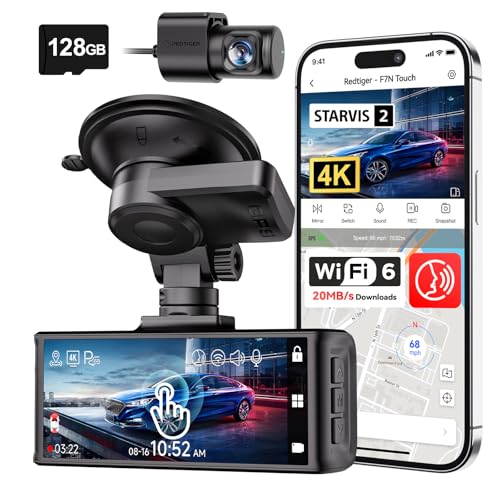
REDTIGER 4K STARVIS 2 Dashcam Front Rear
A reliable pick for REDTIGER 4K STARVIS 2 Dashcam, selected based on this article's guidance.
Final Verdict & Decision Framework

Quick Decision Checklist
To finalize your choice, evaluate if your primary goal is evidence collection (local) or remote management (cloud). Most users find that a high-bitrate local-only system offers the best return on investment.
Our Framework for Choosing
| Priority | Recommended System |
|---|---|
| Max Privacy | Local-Only |
| Max Remote Security | Cloud-Connected |
| Zero Monthly Fees | Local-Only |
| Fleet Management | Cloud-Connected |
Frequently Asked Questions
Do all dual-channel dash cams require a subscription?
A: No, the vast majority of dual-channel cameras are fully functional with only a high-capacity microSD card and require zero monthly fees.
What happens if I stop paying the fee for a cloud cam?
A: You simply lose the remote features like cloud backup and live alerts, but the camera continues to record to its local storage.
Can I use my own cloud storage instead of a subscription?
A: Most proprietary cloud dash cams require their specific server ecosystem, so you generally cannot map them to personal cloud storage like Google Drive or Dropbox.
Are there any hidden costs in local systems?
A: Only potential costs are SD card replacements every 1-2 years due to constant re-writing, which is a minor maintenance expense.
Is it hard to install a rear camera without a pro?
A: It requires running a cable through the interior trim of the car, which is manageable for most DIYers but takes time and patience.
Does 24/7 recording consume too much battery?
A: Yes, if not managed by a hardwire kit or external battery pack, 24/7 recording can drain a car battery within a few days of inactivity.
Does cloud functionality affect video quality?
A: Not directly, but uploading video to the cloud often requires the camera to compress files heavily, potentially losing fine details.
Is a dash cam legal in all areas?
A: While dash cams are legal in most places, always check local regulations regarding recording audio or obstructing your windshield view.
Key Takeaways
- 1 Most dash cams function perfectly without a monthly fee.
- 2 Cloud features are strictly optional, focusing on remote alerts and backups.
- 3 Local storage is more reliable and preserves video quality.
- 4 Privacy is higher with a non-connected local storage system.
- 5 Always use high-endurance SD cards to ensure recording stability.
- 6 Hardwire kits are necessary for parking mode, regardless of subscription status.
- 7 Monthly fees are only justified if you require active remote monitoring.
Conclusion
Choosing between a subscription-free local dash cam and a cloud-ready system comes down to how much you value remote accessibility versus data privacy. For the majority of drivers, a high-quality dual-channel camera that writes to local storage provides the perfect balance of security and value without adding a monthly bill to your budget.
If you still have questions about specific features, explore How Does Baby Car Camera Work? Top 5 Systems for 2026 Reviewed to see how hardware-integrated cameras handle connectivity.
Take your time with the installation process; a clean setup is the best defense against hardware failure and ensures your camera remains a reliable witness on the road.