
When upgrading your dashboard, evaluating double din car stereo backup camera compatibility involves choosing between integrated head units and dedicated aftermarket reverse monitor systems. Both approaches aim to enhance vehicle safety, yet they rely on fundamentally different installation architectures.
The confusion often stems from the variety of wiring standards and screen resolutions required for a seamless feed. Many drivers struggle to determine if their existing dashboard space can support a full-featured multimedia unit or if they should opt for a simpler, secondary display system to maintain factory aesthetics.
This guide breaks down the technical requirements, installation trade-offs, and performance benchmarks for both methods. By the end, you will have a clear framework to determine which setup aligns with your vehicle's electrical system and your long-term connectivity goals.
- Hardware connectivity standards (RCA vs. Digital)
- Dashboard real estate and installation complexity
- Power source integration and wiring logic
- Display clarity and latency differences
- Total system upgrade cost and scalability
Overview & Head-to-Head Summary

Integrated Multimedia Head Units
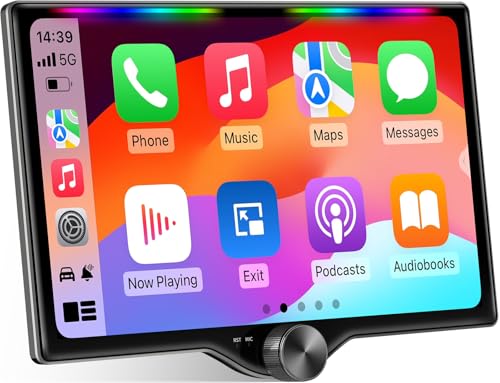
Integrated units replace your current radio with a touchscreen that handles navigation, audio, and camera feeds simultaneously. This provides a clean, factory-like aesthetic but requires more involved wiring during the installation process.
Dedicated Reverse Monitor Systems
These systems use a secondary screen or a clip-on mirror monitor. They are often preferred for older vehicles that lack the space or wiring harness support for a full double DIN upgrade, offering a faster setup time.
| Feature | Multimedia Head Unit | Dedicated Monitor |
|---|---|---|
| Installation | High Complexity | Low Complexity |
| Aesthetics | Factory Look | Noticeable Add-on |
| Functionality | All-in-one | Camera-specific |
| Cost | Variable/Higher | Generally Lower |
Always verify your car's steering wheel control compatibility when choosing a new multimedia head unit, as this often dictates the necessity for additional wiring adapters.
Key Differences & Core Features

System Integration and Architecture
Multimedia units communicate via the car's data bus, allowing the backup camera to trigger automatically when the transmission enters reverse. In contrast, simpler monitors rely on basic 12V trigger wires tapped into the taillights.
Data Throughput and Power
Head units manage complex data streams, whereas dedicated monitors focus solely on signal transmission. Understanding how systems are powered is critical for avoiding interference or screen flickering.
| Criteria | Head Unit System | Separate Monitor System |
|---|---|---|
| Signal Input | RCA or Proprietary | RCA/Wireless |
| Automatic Trigger | CAN-bus/Trigger Wire | Direct 12V Trigger |
| Expandability | High (GPS/Apps) | Low (Video only) |
Performance & Real-World Analysis
Evaluating Signal Integrity
Performance depends on the shielding of the video cable and the stability of the power source. Users should inspect the ground connection specifically, as poor grounding is the primary cause of image noise.
Consistency and Latency
Integrated units occasionally suffer from "boot-up" delay if the infotainment system is slow to initialize. Dedicated monitors often provide a more immediate "instant-on" experience.
When configured correctly, both systems provide reliable safety performance. The difference is primarily in the user interface and feature set, rather than fundamental safety utility.
Best Use Cases & Ideal Scenarios
When Option A Makes More Sense
Choose an integrated multimedia unit if you want a modernized dashboard with Bluetooth, navigation, and seamless backup camera integration. This is perfect for daily drivers where convenience is paramount.
When Option B Makes More Sense
Opt for a dedicated monitor if you are working on a budget project or an older classic car where keeping the factory head unit is a priority. This is also ideal for 24/7 security scenarios where you need a dedicated view.
When It Genuinely Doesn't Matter
If your sole requirement is "seeing what is behind you" and you rarely use advanced multimedia features, the video output quality from a budget camera on either system will be nearly indistinguishable for basic parking purposes.
Recommended Equipment & Solution

SJoyBring 7" QLED Double Din Car Stereo
A reliable pick for SJoyBring 7" QLED Double Din, selected based on this article's guidance.

Leadfan 7inch Car Stereo Double Din Radio
A reliable pick for Leadfan 7inch Car Stereo Double, selected based on this article's guidance.
Final Verdict & Decision Framework
Quick Decision Checklist
Evaluate your budget, the desired visual outcome, and your tolerance for wiring installation. A multimedia unit is an investment in the vehicle's long-term utility, while a monitor is a functional, surgical addition.
Our Framework for Choosing
| Priority | Recommended Path |
|---|---|
| Aesthetics | Integrated Double DIN |
| Speed/Ease | Dedicated Monitor |
| Connectivity | Integrated Double DIN |
| Budget | Dedicated Monitor |
Frequently Asked Questions
Do all double DIN stereos support backup cameras?
A: No, you must confirm that the unit features a dedicated "Camera Input" (usually RCA) before purchase. Not all multimedia units include this feature, particularly older or budget models.
Is the wiring difficult for integrated cameras?
A: It requires tapping into the vehicle's reverse light signal wire and running a trigger cable to the head unit. Most users benefit from professional guidance if they lack experience with automotive electronics.
Can I use a wireless camera with a double DIN unit?
A: Yes, provided the unit has an RCA video input that matches the wireless receiver's output. However, wired connections are generally more reliable for high-definition feeds.
Will I lose my factory backup camera if I switch the head unit?
A: Often, yes. You may need a specific retention module or adapter to ensure the factory camera signal remains compatible with the new multimedia receiver.
How does the camera know when to turn on?
A: The head unit receives a 12V signal via the trigger wire from the reverse light circuit. Once the unit detects this voltage, it automatically switches the display to the camera source.
Are there any special installation tools needed?
A: You will likely need a trim removal tool kit, a multimeter for testing circuits, wire strippers, and crimp connectors. Proper connections are vital for preventing intermittent signal loss.
Do these systems impact the car's battery when off?
A: If installed correctly, they draw negligible power. However, ensure the power source is switched with the ignition so that the screen does not stay active when the car is parked.
Is picture quality better on head units or monitors?
A: It depends primarily on the quality of the camera sensor and the resolution of the screen. Both platforms are equally capable of displaying high-definition images if the hardware is matched correctly.
Key Takeaways
- 1 Integrated units provide a cleaner, unified interior aesthetic.
- 2 Dedicated monitors are easier to install for quick upgrades.
- 3 Verify RCA compatibility before pairing any camera to a new stereo.
- 4 Proper grounding is the most common fix for video flickering.
- 5 Always check if your car requires a steering wheel adapter.
- 6 Automatic triggers require a stable 12V signal from reverse lights.
- 7 Future-proofing favors multimedia head units over static monitors.
Conclusion
Selecting between an integrated head unit and a dedicated backup camera monitor depends on your vehicle's specific constraints and your personal preferences for cabin tech. An integrated system offers a seamless, modern experience, while a dedicated monitor provides a reliable, cost-effective solution for older vehicles.
Whichever path you choose, focus on the quality of the connections and the resolution of the components. For a more comprehensive look at specialized setups, check out our guide on wired vs wireless camera configurations to better understand your specific connectivity needs.
Take your time with the wiring phase, as a clean installation is the best guarantee for a long-lasting, interference-free camera system.







