
How loop recording works on dash cam: Choosing Between Continuous vs. Incident-Only Storage
How loop recording works on dash cam: Continuous Loop Recording versus Event-Triggered Storage represents a critical distinction for driver security. Many users struggle to understand whether their camera is simply filling up a memory card or intelligently managing storage to ensure they never lose vital footage.
This guide clarifies the mechanics of loop recording and helps you choose the storage strategy that best aligns with your driving habits. By analyzing technical trade-offs, we provide a structured framework to help you decide which recording method offers the peace of mind you require for your specific vehicle setup.
- How loop recording works on dash cam memory management.
- Storage capacity requirements for high-resolution video.
- The role of G-sensors in protecting incident footage.
- Why older files are overwritten during continuous recording.
- Balancing continuous security with event-based storage needs.
Overview & Head-to-Head Summary

Continuous Loop Recording Profile
Continuous recording is the standard for most modern dash cams. The device writes video in small segments—usually 1, 3, or 5 minutes—continuously. Once the SD card reaches capacity, the system automatically deletes the oldest file to make room for new footage, ensuring the camera never stops recording.
Event-Triggered (G-Sensor) Storage
Event-triggered storage operates as a subset of loop recording. When a G-sensor detects an impact, hard braking, or rapid acceleration, the camera "locks" the current file to a protected folder. This prevents the loop system from overwriting the file, preserving evidence regardless of how long you continue to drive.
| Feature | Continuous Loop | Event-Triggered |
|---|---|---|
| Primary Goal | Constant Surveillance | Evidence Preservation |
| Overwrite Risk | High (for oldest files) | Low (protected files) |
| Manual Input | None Required | Requires G-Sensor Calibration |
| Storage Demand | Predictable | Variable |
Key Differences & Core Features

Storage Lifecycle and Retention
The core difference lies in the lifecycle of the video data. In continuous mode, retention is determined by the SD card size divided by the bit rate. In event-triggered systems, the partition of the card matters; a common setup allocates 30% of space to "emergency" folders.
Sensor Sensitivity and False Positives
Event-triggered systems rely heavily on sensor sensitivity. If set too high, the system may fill the protected partition with "false alarms" (e.g., hitting a pothole), causing the camera to stop recording new events because the reserved space is full. Continuous recording does not suffer from this issue but may lose evidence if an event isn't manually flagged or properly detected.
| Dimension | Continuous Loop | Event-Triggered |
|---|---|---|
| Architecture | FIFO (First-In-First-Out) | Flagging & Locking |
| Space Allocation | Total Available Space | Partitioned/Reserved |
| Primary Failure Mode | Old data purged | Protected space full |
| Maintenance | Routine Formatting | Periodic Cleanup |
Performance & Real-World Analysis
Evaluating Throughput and Consistency
Performance is often measured by how reliably the camera writes the last frame before a power loss. High-quality systems use capacitors to ensure the final segment is safely saved before the unit shuts down.
Managing Memory Constraints
Best Use Cases & Ideal Scenarios

When Continuous Loop Recording Makes More Sense
Continuous recording is ideal for commuters and daily drivers who want a constant record of their entire route. It is the best "set it and forget it" solution for general road documentation.
When Event-Triggered Storage Makes More Sense
Event-triggered storage is superior for those who prioritize specific insurance evidence. It is essential for fleet management where you only need to review incidents, not hours of uneventful highway driving.
When It Genuinely Doesn't Matter
If you have a high-capacity SD card (256GB+), the difference between the two becomes negligible. With massive storage, you will likely have days or weeks of footage, effectively turning the loop into a long-term archive.
Recommended Equipment & Solution
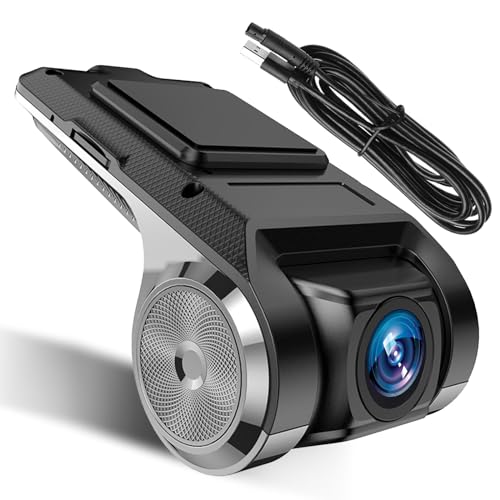
Inefala USB Car DVR Camera Video Recorder
A reliable pick for Inefala USB Car DVR Camera, selected based on this article's guidance.

Car Camera USB Recorder, Loop Recording ADAS
A reliable pick for Car Camera USB Recorder, Loop, selected based on this article's guidance.
Final Verdict & Decision Framework

Quick Decision Checklist
If your goal is maximum evidence retention for incidents, ensure your device has robust event-locking. If your goal is broad road awareness, prioritize high-speed, continuous loop endurance.
Our Framework for Choosing
| If your priority is... | Recommended Choice |
|---|---|
| Documenting long road trips | Continuous Loop Recording |
| Evidence for accidents | Event-Triggered Locking |
| Budget-conscious storage | Small partition for events |
Frequently Asked Questions
Does loop recording delete important files?
A: Generally no, provided you have G-sensor protection active for events.
How long does a 64GB card last?
A: It depends on bitrate, but typically 6-10 hours of high-definition video before looping.
Can I turn off loop recording?
A: Most dash cams do not allow this, as it is essential for the device to function when the card is full.
What happens if the power cuts during a loop?
A: High-quality cams use capacitors to finalize and save the current segment.
Why do I need to reformat my SD card?
A: It helps prevent file system fragmentation and ensures the loop mechanism runs smoothly.
Does 4K recording affect loop duration?
A: Yes, 4K footage consumes space roughly 2-3 times faster than 1080p, shortening the loop cycle.
What is a G-sensor?
A: It is an accelerometer that detects sudden changes in motion, signaling the camera to lock a file.
Is loop recording the same as parking mode?
A: No, though both use the same storage mechanism to save space over time.
Key Takeaways
- 1 Loop recording is the fundamental way dash cams prevent card-full errors.
- 2 G-sensors are vital for protecting incident footage from being overwritten.
- 3 Card capacity directly dictates how many hours you can retain before loops begin.
- 4 Regular formatting is the most effective way to prevent recording failures.
- 5 High-endurance SD cards are required for cameras that overwrite data frequently.
- 6 Event-triggered locking works best when sensitivity is balanced correctly.
- 7 A balanced system uses both continuous recording and event flagging.
Conclusion
Understanding how loop recording works on dash cam systems allows you to set up your device for maximum reliability. By acknowledging the trade-offs between continuous footage and event protection, you can ensure your camera is ready when you need it most.
Whether you rely on constant documentation or specific incident protection, the key is proper card maintenance. For further advice on power and reliability, consider 5 Best Spare Dash Cam Battery Options for Long-Lasting Parking Mode to keep your system powered during long periods of monitoring.
Always prioritize consistent, reliable storage media to ensure your dash cam captures the truth whenever the road requires it.







