Navigating the complexities of modern vehicle surveillance starts with the Best 4K & Dual Dash Cams : Clear Front and Rear Coverage (2026) Sizing & Specs Checklist, designed to ensure you capture every detail on the road with precision.
This guide is crafted for vehicle owners and DIY enthusiasts who want to move beyond basic setups. We assume a foundational comfort with basic vehicle maintenance and electronic components, aiming to elevate your technical proficiency in selecting and deploying high-resolution camera systems.
By the end of this guide, you will be able to evaluate hardware specifications confidently, understand mounting requirements for dual-channel systems, and troubleshoot common performance issues to maintain crystal-clear coverage.
- How to interpret sensor resolution versus bitrate for 4K video quality.
- Understanding the physical footprint and mounting constraints for front and rear lenses.
- The importance of thermal regulation in high-performance dash cams.
- Matching SD card storage performance to dual-stream recording demands.
- Strategic positioning to maximize road coverage and minimize blind spots.
Overview & Prerequisites

Defining Your Hardware Requirements
Before purchasing, it is critical to align your vehicle's interior layout with the physical size of your chosen dash cam. The Best 4K & Dual Dash Cams : Clear Front and Rear Coverage (2026) Sizing & Specs Checklist includes considerations for windshield clearance, cable routing lengths for rear cameras, and power supply stability via hardwire kits or cigarette lighter adapters.
Essential Tools for Installation
To implement a dual-cam setup, ensure you have a trim removal tool kit, high-endurance microSD cards (U3/V30 rated), and a 12V circuit tester if you plan to hardwire. For those unsure about managing files after the install, review How to Transfer Dash Cam Footage: A Complete Guide for Every Device to prepare for future maintenance.
Core Concepts & Fundamentals

Understanding 4K Bitrate and Compression
True 4K performance is defined not just by pixel count, but by the bitrate at which the footage is written. Higher bitrates provide more visual data, which is essential for reading license plates at high speeds. When selecting units, prioritize those that offer H.265 compression, which maintains file quality while optimizing storage space compared to older formats.
The Geometry of Dual-Lens Coverage
Effective dual-channel coverage requires careful calibration. The front camera should be mounted to capture the full width of the road, while the rear camera requires a clean path through the rear windshield to avoid distortion. Learn more about optimizing these setups in our guide on the Best Dash Cams 2026 Amazon: Secure Your Vehicle With Precision.
| Feature | Correct Approach | Incorrect Approach |
|---|---|---|
| Resolution | Native 4K (3840x2160) | Interpolated 4K (Software upscaled) |
| Storage | High-Endurance U3/V30 Card | Generic, low-speed consumer SD Card |
| Installation | Hidden cable routing | Exposed wires obstructing view |
Step-by-Step Execution Guide

Preparation Phase
Clean your windshield thoroughly with isopropyl alcohol to ensure the adhesive bond holds for the long term. Map out your path from the front unit to the fuse box and from the front unit to the rear glass.
Execution Phase
For more advanced setups, see Step-by-Step: How to Setup, Configure & Master How to Transfer Dash Cam Footage: A Complete Guide for Every Device.
Recommended Equipment & Solution

4K Dash Cam Front and Rear Inside,3.16"
A reliable pick for 4K Dash Cam Front, selected based on this article's guidance.

REDTIGER 4K STARVIS 2 Dashcam Front Rear
A reliable pick for REDTIGER 4K STARVIS 2 Dashcam, selected based on this article's guidance.
Best Practices & Pro Tips
Thermal Management and Longevity
4K processors generate significant heat. Mount your camera in an area that receives some airflow and avoid mounting directly in front of large plastic trim pieces that might trap heat. During summer months, use a sunshade to protect the unit while parked.
Optimizing Storage Lifecycle
Dash cams perform constant write cycles, which wear out standard SD cards quickly. Use cards labeled "High Endurance" specifically designed for surveillance to ensure you don't encounter file corruption during critical incidents.
Troubleshooting & Common Pitfalls
Resolving Connectivity Issues
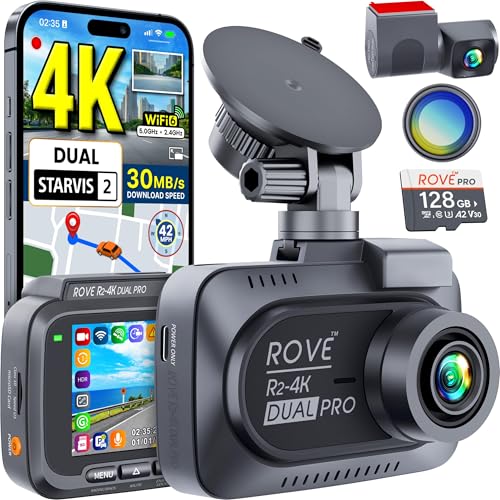
If your dash cam fails to connect to your phone, reset the Wi-Fi settings on the unit first. Interference from other vehicle electronics can sometimes cause drops. For persistent issues, consult 7 Common Problems with Best 4K & Dual Dash Cams : Clear Front and Rear Coverage (2026) (and Quick Fixes).
Hardware Failure Modes
Power cycling usually points to a bad cable or an under-voltage issue at the fuse tap. If your rear camera displays a blank screen, ensure the connection cable is fully seated at both the hub and the camera port.
Frequently Asked Questions
Is 4K resolution necessary for a dash cam?
A: 4K is beneficial for capturing fine details like license plates at a distance. However, it requires more storage, so ensure you have a large-capacity, high-endurance card.
Can I install a dual dash cam myself?
A: Yes, most users can complete the installation with basic tools. If you are uncomfortable with electrical work, professional installation is recommended.
Why does my rear camera appear blurry?
A: This is often due to dirt on the rear window or a protective film left on the lens. Clean the glass and check the lens cover carefully.
What is a hardwire kit?
A: A hardwire kit connects the camera directly to your car’s fuse box. This allows for features like Parking Mode while keeping the cabin look clean.
How often should I save my footage?
A: You should transfer important footage immediately after an incident. While loop recording works well, it will overwrite older files if the card fills up.
Are all 4K dash cams the same size?
A: No, sizes vary widely based on the processor and cooling requirements. Check the manufacturer’s dimensions before purchasing if space is limited.
What does "Dual" mean in dash cams?
A: Dual-channel dash cams record both the front view and the rear view simultaneously. They provide a much higher level of safety documentation.
Do I need special software to view the videos?
A: Most modern cameras use standard MP4 files. However, the manufacturer's dedicated app often provides extra data like GPS coordinates and speed overlays.
Key Takeaways
- 1 Prioritize native 4K resolution over software upscaling for genuine clarity.
- 2 Use only High-Endurance microSD cards to withstand constant write cycles.
- 3 Clean your windshield thoroughly before mounting to ensure a long-lasting bond.
- 4 Strategic cable routing is essential for a professional and safe cabin environment.
- 5 Monthly reformatting of the SD card prevents common storage-related errors.
- 6 Hardwire kits are necessary to enable advanced Parking Mode security features.
- 7 Regularly test your camera feed and app connectivity to ensure system reliability.
Conclusion
Selecting and installing the best dual-channel 4K system is a significant upgrade for your vehicle's safety profile. By focusing on quality hardware, proper mounting, and routine maintenance, you ensure that you are protected by the best technology available in 2026.
Remember that the system is only as good as its setup. Consistent checks on cable integrity and storage performance will guarantee your dash cam is ready when you need it most. For additional help, check our troubleshooting guide for data transfers.
With careful attention to these specifications, your dash cam will provide reliable, clear, and actionable evidence for years to come.
📌 Pillar Resource: Read our complete our Best 4K & Dual Dash Cams : Clear Front and Rear Coverage (2026) resource for in-depth insights.