
How To Select A Dash Cam involves choosing between two primary architectures: dedicated standalone devices and mobile-based dash cam setups.
Many drivers find themselves at a crossroads when determining which recording method offers the best balance of reliability and convenience. The market is saturated with options, and without a clear understanding of the technical differences, it is easy to invest in a system that doesn't align with your driving habits or privacy requirements.
This guide breaks down the performance metrics, hardware considerations, and long-term reliability of these two approaches. By the end of this article, you will have a clear decision-making framework to determine which system is right for your vehicle.
- Hardware reliability and boot-time performance
- Data storage methods and loop recording longevity
- Privacy implications of cloud versus local storage
- Integration complexity and installation requirements
- Total cost of ownership over a three-year period
Overview & Head-to-Head Summary

Dedicated Dash Cam Hardware
Dedicated cameras are purpose-built devices designed for the specific environment of a vehicle cabin. They handle temperature fluctuations and power cycles automatically, ensuring that how to record dashcam continuously on loop is a seamless, background process.
Mobile App and Smartphone-Based Solutions
Smartphone solutions utilize existing hardware to capture footage. While accessible, these rely on the user to initiate recording and manage thermal loads on the phone battery. For those exploring alternatives, Urning Your Phone Into A Dash Cam: A Simple Guide for Every Driver provides further context on this approach.
| Feature | Dedicated Dash Cam | Smartphone Setup |
|---|---|---|
| Reliability | High (Automated) | Moderate (Manual) |
| Installation | Permanent/Semi-perm | Instant/Temporary |
| Battery Impact | None (Hardwired/12V) | High (Charging) |
| Cost | Moderate | Low (Existing gear) |
Tip: If your vehicle is often parked in direct sunlight, dedicated hardware with capacitor-based power supplies generally handles thermal stress better than lithium-ion smartphone batteries.
Key Differences & Core Features

Data Integrity and Recording Persistence
Dedicated systems are designed to overwrite old files consistently, whereas mobile apps may struggle with storage management if the phone is also used for personal photos and media. This distinction is critical when comparing Dash Cam Without Phone App: 5 Top Models Compared vs Top Competitors: Which is Best? to other categories.
Privacy and Connectivity Architecture
Dedicated units often offer local storage that does not require an internet connection, which is a major advantage for security-conscious drivers. See Best Non WiFi Dash Cam for Guaranteed Privacy and Reliability vs Top Competitors: Which is Best? to understand the trade-offs.
| Aspect | Dedicated Unit | Phone App |
|---|---|---|
| Storage | Dedicated microSD | Internal Phone Storage |
| Connection | Optional Wi-Fi/No App | Integrated Connectivity |
| Operation | Set and Forget | Manual Launch |
Performance & Real-World Analysis

Testing Reliability Under Daily Load
To evaluate these systems, you must assess how they behave during a standard commute. A dedicated system should begin recording within seconds of engine ignition.
Evaluating Long-Term System Stability
Over time, hardware systems maintain consistent performance, while mobile apps can become sluggish if the operating system updates or available storage space decreases.
Performance remains most stable when the dash cam operation is decoupled from your primary smartphone tasks, preventing phone overheating or notification interference during critical recording moments.
Best Use Cases & Ideal Scenarios

When Option A Makes More Sense
A dedicated dash cam is superior for daily commuters who prioritize reliability and the "set and forget" mentality. For more specific configurations, check out Step-by-Step: How to Setup, Configure & Master Dash Cam Without Phone App: 5 Top Models Compared.
When Option B Makes More Sense
Smartphone apps are ideal for short-term use, such as driving a rental car or documenting a specific road trip where a permanent mount is not feasible.
When It Genuinely Doesn't Matter
If you only drive occasionally in low-traffic areas, the baseline functionality of either system will likely satisfy basic requirements for event logging.
Recommended Equipment & Solution
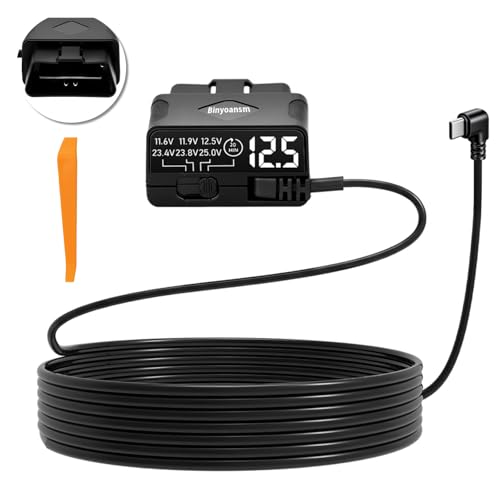
OBD 2 Dash Cam Hardwire Kit USB
A reliable pick for OBD 2 Dash Cam Hardwire, selected based on this article's guidance.

EWAY USB C to 90 Degree USB
A reliable pick for EWAY USB C to 90, selected based on this article's guidance.
Final Verdict & Decision Framework

Quick Decision Checklist
Ask yourself: Is this for a daily driver (Dedicated) or occasional, temporary use (Smartphone)? How much value do you place on privacy and automated recording?
Our Framework for Choosing
| Priority | Recommended Path |
|---|---|
| High Reliability | Dedicated Hardware |
| Low Budget/Temporary | Smartphone App |
| Data Privacy | Dedicated Non-WiFi Unit |
Frequently Asked Questions
Can I use a smartphone as a permanent dash cam?
A: It is generally discouraged due to the risk of battery swelling from constant charging and thermal exposure.
Are dedicated dash cams hard to install?
A: Many units now offer plug-and-play setups that fit easily into the 12V cigarette lighter socket.
Do I need a high-speed memory card for a dash cam?
A: Yes, high-endurance cards are recommended to handle the constant read/write cycles of loop recording.
Is Wi-Fi necessary for a dash cam?
A: No, many users prefer non-Wi-Fi models for increased privacy and simpler, offline operation.
Will a dash cam drain my car battery?
A: If hardwired correctly, most modern dash cams have a cutoff voltage to prevent battery drain.
Can I review footage on the camera itself?
A: Most dedicated dash cams have a small screen for immediate playback, while smartphone apps rely on the phone screen.
Does the camera quality matter for incident reporting?
A: Higher resolution (1080p or 4K) is generally better, but dynamic range is more important for identifying plates in low light.
Are there legal restrictions on dash cams?
A: Some regions restrict windshield-mounted devices; always verify local traffic codes before installation.
Key Takeaways
- 1 Dedicated units provide superior reliability for daily drivers.
- 2 Smartphone solutions are best suited for temporary, short-term needs.
- 3 Thermal management is the biggest risk factor for phone-based systems.
- 4 Loop recording is standard in hardware but optional or limited in apps.
- 5 Privacy-focused users should prioritize non-Wi-Fi dedicated hardware.
- 6 High-endurance microSD cards are essential for any dedicated camera.
- 7 Consistent automated boot-up is the most critical feature to look for.
Conclusion
Selecting between a dedicated dash cam and a smartphone setup ultimately depends on your commitment to reliability versus convenience. Dedicated hardware is an investment in safety that works autonomously, whereas smartphone apps are best viewed as temporary tools.
By assessing your specific needs—whether it is protecting a commute or simply documenting an occasional trip—you can choose the path that offers the most peace of mind on the road. For further reading, see Step-by-Step: How to Setup, Configure & Master Best Non WiFi Dash Cam for Guaranteed Privacy and Reliability.
Choose a system that you will trust to perform automatically without requiring your attention while driving.







