Looking for dash cam without smart phone dependency is a smart move for drivers seeking simplicity, privacy, and reliability. This guide provides 10 expert-tested tips to help you choose, install, and maintain a standalone recording system effectively.
By opting for non-connected devices, you avoid complex firmware updates, app permission issues, and potential data privacy concerns. These tips will ensure your road security remains robust while keeping your digital footprint minimal.
Tip 1: Prioritize Physical Controls for Dash Cams

Focus on Tactical Buttons
When looking for dash cam without smart phone features, ensure the device has dedicated physical buttons. This allows you to lock files or change settings while driving without needing a secondary device.
Verify Menu Accessibility
Look for models that allow full menu navigation directly on the unit. Physical buttons provide tactile feedback, which is safer and more reliable than capacitive screens during emergency situations.
Tip 2: Choosing On-Device Display Monitors

Selecting the Right Screen Size
A built-in LCD screen is essential for instant playback. If you are looking for dash cam without smart phone requirements, the screen acts as your primary interface.
Resolution Considerations
Ensure the built-in monitor displays at least 720p or 1080p resolution. This allows you to verify that your camera is aligned correctly without needing a smartphone app to check the frame.
Tip 3: The Importance of High-Endurance Storage

Choosing SD Card Types
Always use High-Endurance microSD cards specifically designed for dash cams. These cards are built to withstand the constant overwrite cycles required when using a standalone camera.
Capacity Planning
Select a 128GB or 256GB card if the unit supports it. Since you cannot offload files via a cloud app, larger local storage prevents important footage from being overwritten too quickly.
Tip: Format your SD card monthly directly through the dash cam menu to prevent file system corruption and ensure reliable recording.
Tip 4: Evaluating Recording Quality

Identifying 4K vs 1080p
Looking for dash cam without smart phone integration often leads to high-quality dedicated hardware. Prioritize sensors that offer true 4K resolution for better license plate recognition.
Night Vision Capabilities
Check for WDR (Wide Dynamic Range) features. This technology balances lighting in high-contrast areas, ensuring that street signs and vehicle details remain visible at night without needing post-processing software.
Recommended Equipment & Solution
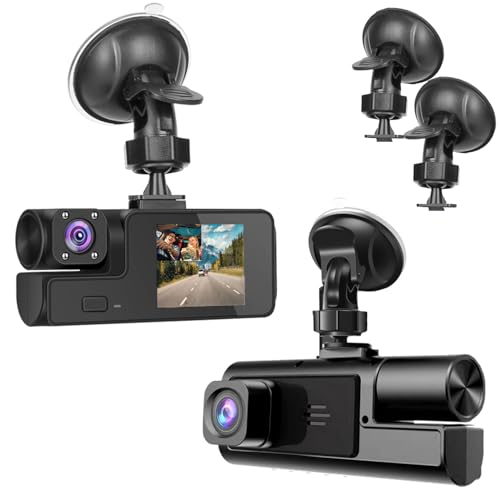
1080P Dual Dash Camera for Car Front
A reliable pick for 1080P Dual Dash Camera, selected based on this article's guidance.

4G LTE Dash Cam Front and Inside
A reliable pick for 4G LTE Dash Cam Front, selected based on this article's guidance.
Tip 5: Optimal Positioning Strategies

Placement for Visibility
Before finalizing your setup, refer to guides on the Best Place To Position A Dash Cam to ensure you aren't obstructing your own view.
Step-by-Step Installation
Tip 6: Managing Loop Recording Settings
Understanding Segment Lengths
Configure your dash cam to record in 3-minute loops. This is the industry standard, allowing for easy file management when you manually pull the SD card for review.
Ensuring Continuous Functionality
Warning: Avoid setting loops to longer than 5 minutes. Longer files take more time to process and are more likely to become corrupted if power is lost during a collision.
Tip 7: Hardwiring for Continuous Power
Installation Benefits
Hardwiring your camera ensures it starts recording the moment the engine turns on. This removes the need to manually plug in power cables every time you drive.
Component Comparison
| Power Method | Reliability | Ease of Use |
|---|---|---|
| Cigarette Lighter | Medium | High |
| Hardwire Kit | Very High | Medium |
| Battery Pack | High | High |
Tip 8: Protecting Your SD Card Data
Manual Backup Habits
Since you are looking for dash cam without smart phone syncing, you must adopt a manual backup schedule. Take the SD card out once a week to back up critical footage to your home computer.
Using Lock Functions
Use the "Event" or "Emergency" button on your dash cam whenever you witness an incident. This flags the file as "read-only," ensuring it won't be overwritten by the loop recording cycle.
Tip 9: Using Independent Parking Modes
Motion Detection vs. G-Sensor
Look for standalone dash cams that feature built-in G-sensors. These sensors trigger recording upon impact or motion, even when the car is parked and you are not present.
Success: Using a hardware-based G-sensor allows your camera to act as a security guard for your vehicle without requiring an active Bluetooth or Wi-Fi connection.
Tip 10: Regular Maintenance Checks
Verification Protocols
Every time you enter your car, check the screen to ensure the "recording" icon is visible. This simple visual cue is the fastest way to verify function without needing a phone.
Firmware via Memory Card
Check the manufacturer's website periodically for firmware updates. You can usually install these by loading the update file onto your microSD card and inserting it into the device.
Common Mistake 1: Blocking Vision
Installing the unit too low on the windshield obstructs driver view and may violate local traffic laws regarding visual obstruction.
Common Mistake 2: Cheap SD Cards
Using standard consumer SD cards instead of High-Endurance variants leads to premature failure and lost video files during critical moments.
Common Mistake 3: Ignoring Angle
Failing to verify the vertical angle means your camera may only be recording the hood of your car or the sky, missing the traffic events entirely.
Frequently Asked Questions
Can I operate a dash cam effectively without a smartphone app?
Yes, many standalone dash cams feature built-in LCD screens and physical buttons that allow you to manage settings, adjust configurations, and review footage directly on the device.
How do I view recorded footage if the camera lacks phone connectivity?
You can view footage by removing the microSD card and inserting it into a computer, or by using the dash cam’s built-in playback screen to view files on the go.
Does a dash cam without a smartphone app lose any key features?
You will lose the convenience of instant cloud uploads and remote live-viewing, but you retain all critical recording functions like loop recording and G-sensor impact detection.
How do I update the firmware on a dash cam without a companion app?
Firmware updates are typically performed by downloading the file from the manufacturer’s website onto a microSD card, which the camera then detects and installs upon startup.
Are screen-based dash cams more difficult to install than app-based models?
No, they are often easier to install because they do not require complex Bluetooth or Wi-Fi pairing processes, simply plug them into your 12V outlet and they begin recording.
How do I manage or format my memory card without a smartphone?
Most dash cams with screens include a 'Format' option directly within their internal menu system, allowing you to wipe or maintain your storage card manually.
Are there specific brands that specialize in non-smart dash cams?
Brands like Vantrue, Rexing, and Garmin often offer models with high-resolution built-in screens specifically designed for users who prefer to avoid smartphone dependency.
Is a dash cam without a smartphone still reliable for insurance claims?
Yes, as long as the device records video to a high-quality microSD card, the physical evidence remains legally valid for insurance purposes when transferred to a computer.
Key Takeaways
- 1 Prioritize units with physical buttons for reliable, offline file locking.
- 2 Use High-Endurance microSD cards to prevent data loss.
- 3 Rely on the built-in LCD screen for framing and alignment.
- 4 Perform weekly manual backups of your SD card to protect footage.
- 5 Hardwire your dash cam for automatic "set and forget" operation.
- 6 Check for the "recording" icon on the unit screen every time you drive.
- 7 Install firmware updates manually via your computer and the SD card.
Summary
Choosing a dash cam without smart phone connectivity is a reliable way to maintain your vehicle's safety while avoiding unnecessary digital complexity. By focusing on quality hardware, proper installation, and manual maintenance, you create a robust security system.
For more details on finding the right hardware for your specific vehicle, explore the Mangoal 4k Dash Cam Review to see how high-quality, non-app-dependent cameras perform in real-world scenarios.
Simplicity in hardware often leads to the highest levels of long-term reliability on the road.