Determining what is the longest loop dash cam often leads to confusion between physical storage capacity and intelligent compression efficiency.
This guide is designed for vehicle owners and security enthusiasts who require extended recording times without manual file management. We assume a baseline familiarity with basic dash cam operation, though we will break down technical parameters into actionable logic.
By the end of this manual, you will be able to calculate your specific storage needs, adjust camera settings for maximum loop duration, and understand the relationship between video resolution and memory retention.
- Understanding the impact of bitrate on storage.
- Calculating file sizes based on resolution and frames per second.
- Selecting the correct high-endurance memory card.
- Managing loop overwrite settings effectively.
- Extending runtime with external power solutions.
Overview & Prerequisites

Defining the Longest Loop Capability
When asking what is the longest loop dash cam, you are essentially asking about the synergy between your camera’s compression engine and your microSD card capacity. A dash cam's "loop" is the process of recording segments and overwriting the oldest files once the storage is full. The "longest loop" refers to the total duration of footage retained on the card before the first file is overwritten.
Technical Prerequisites
To achieve long-duration recording, you must utilize high-endurance memory cards designed for constant write cycles. Standard consumer-grade cards will fail prematurely under the strain of continuous loop recording. Additionally, learning do dash cams record when the car is off? is essential if you want to extend your security coverage into parking scenarios.
Core Concepts & Fundamentals

Bitrate vs. Resolution
The core factor determining loop length is the bitrate (megabits per second). Even if you reduce resolution to 1080p, a high-bitrate setting will fill your card faster than a 4K setting with an efficient compression codec (H.265). Understanding this balance is the primary secret to mastering what is the longest loop dash cam can offer.
Storage Compression Standards
Modern devices use H.265 (HEVC) compression, which is significantly more efficient than the older H.264 standard. If your device supports HEVC, ensure it is toggled on to effectively double your recording duration without sacrificing significant image quality.
| Feature | Incorrect Mental Model | Correct Professional Model |
|---|---|---|
| Loop Logic | Assuming 128GB = X hours | Bitrate determines duration, not just capacity |
| Codecs | H.264 is sufficient | H.265/HEVC is required for maximum efficiency |
| Memory | Use any brand-name card | Only High-Endurance/Dash Cam specific cards |
For more specialized setups, consider resources like how does baby car camera work? to see how specific camera hardware impacts continuous monitoring.
Step-by-Step Execution Guide

Preparation Phase
Before optimizing, ensure your firmware is updated. Manufacturers often release patches that improve video encoding efficiency, which directly impacts how much footage fits on a card. Check your manufacturer's portal for 2026 software updates.
Configuration Phase
Standardize Compression: Access the system settings and navigate to the video codec menu. Select H.265 or HEVC. This reduces file size by approximately 30-50% compared to H.264.
Optimize Segment Length: Set your loop duration to 3 or 5-minute clips. Shorter clips are easier for the camera to index and less likely to corrupt during a power loss.
Calculate Capacity: Purchase a 512GB high-endurance card. Verify if your dash cam supports the SDXC standard for capacities exceeding 256GB.
Validate Loop Cycle: Record for one full loop cycle and verify that files are being overwritten correctly without gaps.
Recommended Equipment & Solution
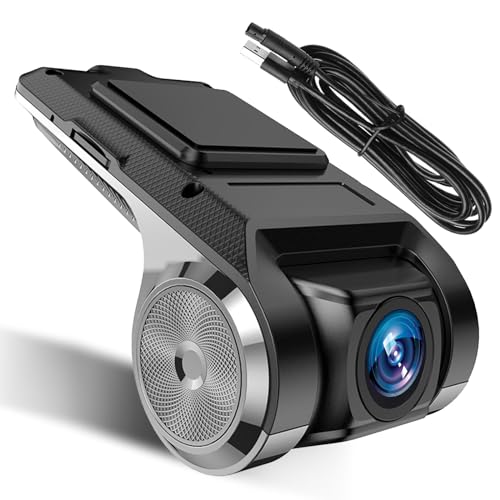
Inefala USB Car DVR Camera Video Recorder
A reliable pick for Inefala USB Car DVR Camera, selected based on this article's guidance.

70mai M310 Plus 4K Dash Cam Front
A reliable pick for 70mai M310 Plus 4K Dash, selected based on this article's guidance.
Best Practices & Pro Tips

Maintaining System Integrity
To maintain the longest possible loop, avoid using the "Emergency" or "Lock" function excessively. Every time the camera locks a file, that space is reserved and cannot be overwritten by the loop, which rapidly reduces your effective storage capacity.
Environmental Considerations
Troubleshooting & Common Pitfalls

Diagnostic Procedures
If you find that your dash cam stops recording before the card is full, it is likely a file system error or a conflict with the G-sensor sensitivity. Check the Baby Car Camera Mounting Tips for advice on reducing vibration-induced false triggers.
Frequently Asked Questions
Does a larger SD card always mean a longer loop?
A: Yes, provided your camera hardware supports the specific file system standard of that card size. Always check the manufacturer's maximum supported capacity.
Will lowering resolution help the loop?
A: Lowering resolution reduces data volume, but lowering the bitrate is much more effective for extending recording time.
What is the best card for dash cams?
A: Look for cards labeled "High Endurance" or "Dash Cam" specific, as they are optimized for continuous rewrite cycles.
How often should I reformat?
A: It is professional practice to format your card once a month to clear out fragmented data and maintain write speeds.
Do dual-channel cameras affect loop time?
A: Yes, dual-channel systems split the bandwidth and storage between two cameras, effectively halving the total duration per card.
Does night mode affect file size?
A: Yes, nighttime video often contains more "noise" (grain), which makes the compression algorithm work harder, leading to larger file sizes.
Is H.265 mandatory?
A: It is not mandatory, but it is highly recommended to significantly increase the storage efficiency of your loop.
Why do my files show as 'locked'?
A: Files are marked 'locked' by the G-sensor during sudden movements; these files do not get overwritten in the normal loop cycle.
Key Takeaways
- 1 Bitrate, not resolution, is the primary driver of storage consumption.
- 2 Use H.265/HEVC encoding to gain 30-50% more storage efficiency.
- 3 High-Endurance microSD cards are non-negotiable for longevity.
- 4 Regular monthly formatting prevents file system corruption.
- 5 Excessive G-sensor sensitivity locks too many files and shortens your effective loop.
- 6 Dual-channel setups require larger capacity cards to maintain similar loop lengths to single-channel cams.
- 7 Always verify your device's maximum SD card capacity before purchasing an upgrade.
Conclusion
Mastering what is the longest loop dash cam allows you to balance high-quality surveillance with reliable, long-term data retention. By understanding that your camera is an active storage system, you can move away from default settings toward a configuration that prioritizes your specific security needs.
Remember that the best dash cam is one that remains reliable under pressure. Regularly verifying your loop functionality ensures that when you actually need the footage, it is there waiting for you.
Take control of your storage now to ensure your road security remains uninterrupted throughout 2026.